Receivables Automation: Can AI Decide the Right Overdue Invoice Email?
Receivables automation test: can AI choose the right next step on overdue invoices in Xero and QuickBooks? Claude scored 98%.
Watch the YouTube video
Watch on YouTubeArticle Summary
- 01
Claude scored 334 out of 340 points (98%) on its first attempt, getting 31 of 34 checkpoints completely right.
- 02
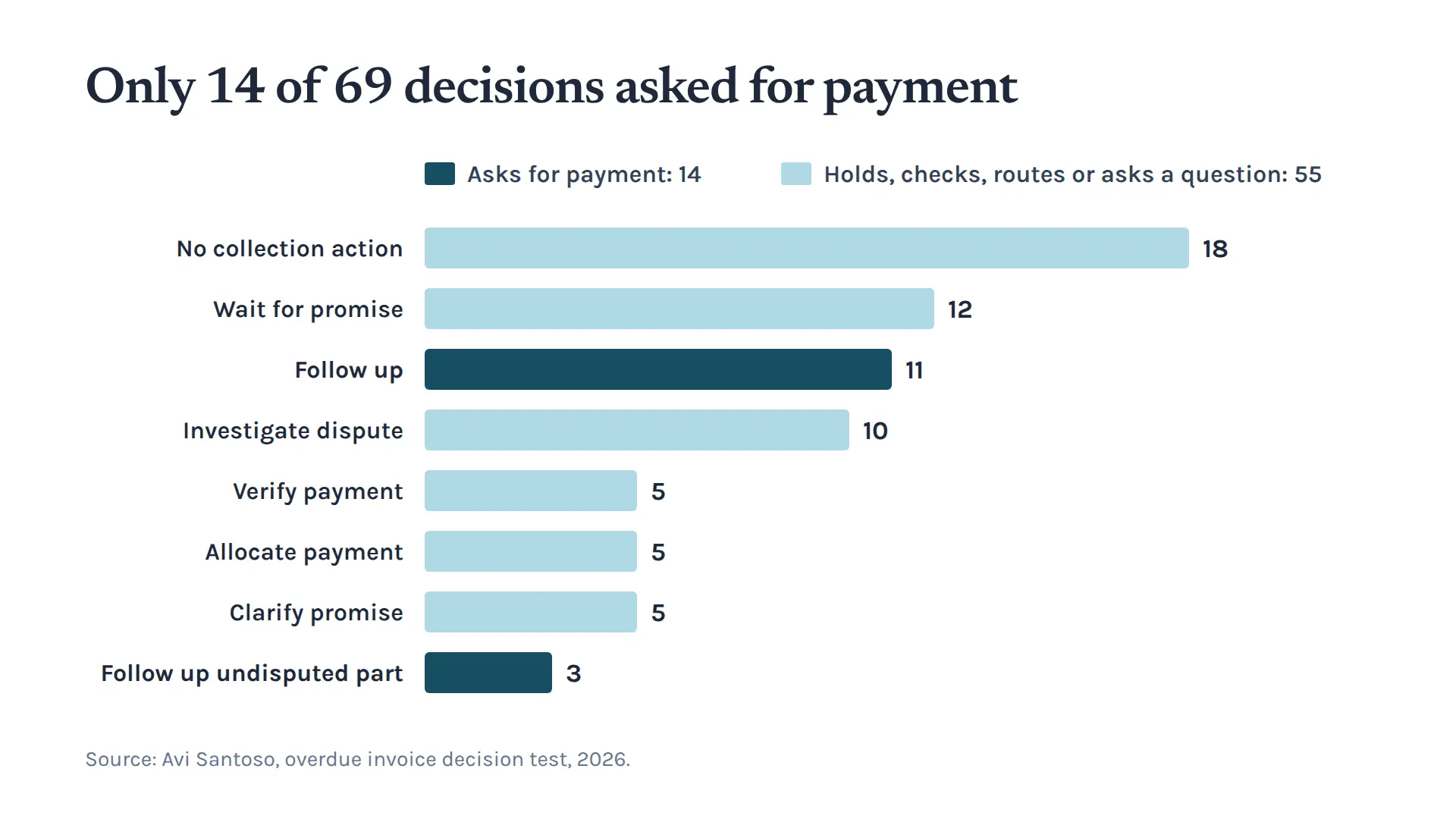
Of 69 expected invoice decisions, only 14 were to ask the customer for money, while 55 were to wait, verify, clarify, allocate or route a dispute.
- 03
Connected to live Xero, QuickBooks Online and Gmail accounts, every customer message remained an unsent draft for owner approval.
In our receivables automation test, Claude chose the correct next step on overdue invoices in 98% of scored points on its first attempt. Only 14 of 69 decisions were to ask the customer for money.
We tested whether AI can decide the right next step on an overdue invoice for an Australian commercial HVAC servicing and repair business. When receivables automation relies only on due dates, it misses payments, promises and disputes sitting in the inbox and bank feed. Chasing a customer who has already paid strains the relationship. Missing a broken promise delays cash. Demanding a disputed charge in full can turn a $500 disagreement into a dispute over a $2,400 invoice.
The main value of accounts receivable automation is in the decisions to wait, verify, clarify or route a dispute. In our test, 55 of 69 decisions held back a reminder, routed work inside the business or asked the customer a question so staff could check facts or wait for promised payments.
What Receivables Automation Needs to Read Before Chasing
The right next step on a late invoice depends on facts spread across the ledger, the inbox, the job file and the calendar.
We compared the assistants with a day-count reminder rule that decides from days overdue alone. An unpaid invoice can exist in many different states:
- A customer has paid, and the money sits in the bank feed waiting for allocation.
- A customer made a partial payment and promised the balance by a specific date.
- A customer disputed a charge on the job.
- A customer paid without sending an email, or reported a payment that had not yet arrived.
When collections rely on days overdue alone, errors in either direction cost money. In our test, the day-count rule chased a customer who had promised to pay. The AI assistant paused follow-up for one business day while a reported transfer was checked.
What We Tested: 34 Checkpoints and 69 Invoice Decisions
We tested nine customer histories across 34 points in time. The accounts covered silent payments, reported transfers, vague and revised promises, part payments, combined receipts and disputed work.
At each checkpoint, the assistant saw only the evidence available at that moment. Each decision was scored out of 10 against an agreed answer key locked before any assistant ran. Points measured seven areas: customer and invoice association, amounts, payment visibility, cited evidence, human safety, primary actions and calendar handling.
Codex helped build the rules. It then scored 117 out of 120 on 12 new checkpoints and chose the correct primary action at all 12. Claude was then evaluated on the frozen rules across all 34 checkpoints on its first pass, without seeing the answers in advance.
A perfect checkpoint gets all seven areas right.
Key Results: 55 of 69 Decisions Called for Judgment
Claude scored 334 out of 340 points (98%) on its first attempt, with 31 of 34 checkpoints perfect. It attached every payment, promise and dispute to the right invoice and calculated every balance correctly.
Claude's 334 points break down by category:
- Customer and invoice association: 68 out of 68 points.
- Amounts: 68 out of 68 points.
- Payment visibility: 34 out of 34 points.
- Evidence and uncertainty: 34 out of 34 points.
- Human control and safety: 33 out of 34 points.
- Actions and control events: 66 out of 68 points.
- Date and calendar: 31 out of 34 points.
Across the 69 expected invoice decisions, only 14 were to ask the customer for money:
- 18 decisions were to take no action: The invoice was settled, or the balance was not yet eligible for follow-up.
- 12 decisions were to wait for a promise: The customer had given a clear payment date, and that date had not yet passed.
- 11 decisions were to follow up: The invoice was eligible, with no active promise, payment claim or open dispute.
- 10 decisions were to investigate a dispute: The customer questioned work or charges, requiring review by the service manager.
- 5 decisions were to verify payment: The customer claimed payment had gone out, requiring verification by accounts.
- 5 decisions were to allocate payment: A likely receipt appeared in the bank feed and needed matching.
- 5 decisions were to clarify a promise: The customer promised payment but omitted the date, amount or invoice.
- 3 decisions were to follow up an undisputed portion: The customer disputed part of an invoice while accepting the remaining balance.
We also ran a day-count reminder rule, which decides from days overdue alone, across 19 checkpoint runs. It passed 15 times and failed 4. All four failures were unnecessary follow-ups. It chased a day after a reminder had already gone out. It chased a customer who had promised to pay. It also chased when it should have held or asked a question. Every draft it produced was a generic single line stating that the invoice was overdue.
How the Receivables Automation Rules Work
Before any assistant ran, the owner approved six rules:
- An invoice becomes eligible for follow-up on day 8 overdue and stays eligible across weekends and holidays.
- A reported or possible payment pauses follow-up for one business day while it is checked.
- A promise counts as missed only after the promised day ends and the next business-day check finds no payment.
- A proposed send time must fall between 8:00 am and 5:00 pm on a working day for both the business and the customer.
- An undisputed balance can be followed up while the disputed part is investigated.
- Every customer message needs the owner's approval.
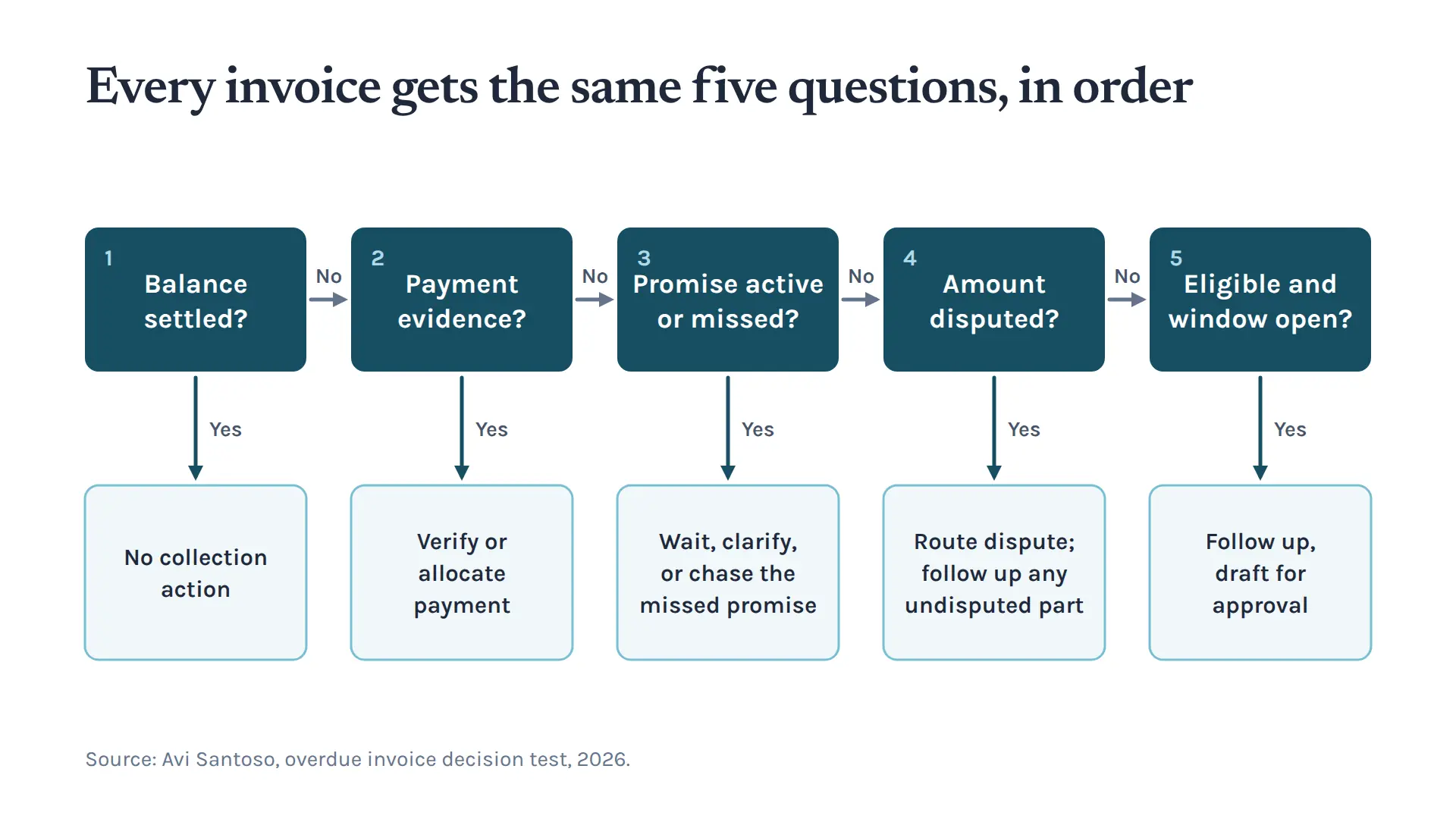
For every invoice, the assistant answers five questions in the same order:
- Is the balance settled?
- Is there payment evidence?
- Is a promise active or missed?
- Is any amount disputed?
- Is the invoice eligible and the calendar window open?
Payments, Promises and Disputes
In real business operations, overdue balances change state constantly as customers communicate.
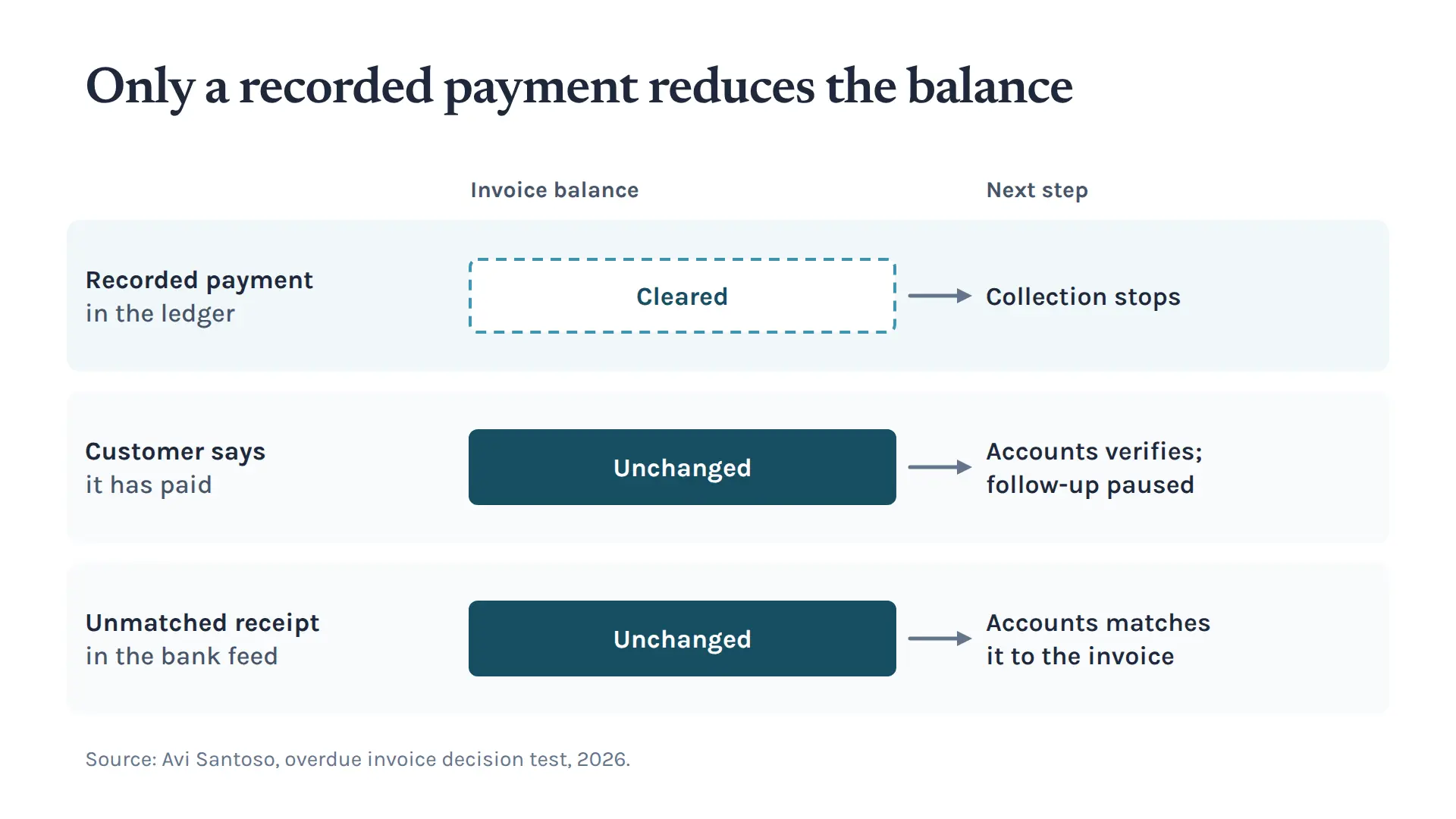
Claude kept three payment states separate at all 34 checkpoints:
- A recorded payment that clears an invoice in the ledger.
- A customer's claim that it has paid, which leads to verification.
- An unmatched receipt in the bank feed, which leads to allocation.
Neither a customer's payment claim nor an unmatched bank receipt reduces the ledger balance until confirmed. A recorded payment that clears the balance stops collection immediately. When a customer reported a transfer, the assistant paused follow-up for one business day and routed verification to accounts. When an unallocated receipt appeared, the assistant asked accounts to match it.
The assistants managed payment promises by tracking exact dates. When a customer gave an ambiguous promise, the assistant drafted a message asking for clarification. Once a specific date was confirmed, the assistant held collection while the promise was running and followed up only after the promised day passed without payment.
For disputed work, the assistants paused collection on that invoice and prepared a dossier for the service manager showing what was proven, contested and missing. When an invoice had an undisputed portion alongside a disputed charge, the assistants split the invoice into two decision rows. They drafted a request for the undisputed $1,900 and routed the disputed $500 to the service manager.
Connecting to Live Xero, QuickBooks and Gmail Accounts
Both assistants were also tested against live accounts. They read the nine customer records recreated in a live Xero organisation, a live QuickBooks Online company and a live Gmail mailbox.
Both assistants matched every customer balance across all nine accounts in both systems. Both assistants treated an invoice as paid once the payment was allocated in the ledger, and left bank reconciliation to the accounting user.
During the live runs, the accounting connections could only read. The only permitted write was saving an unsent draft in Gmail. The recipient had to come from the header of the customer's own Gmail message, never from a name or an accounting contact record.
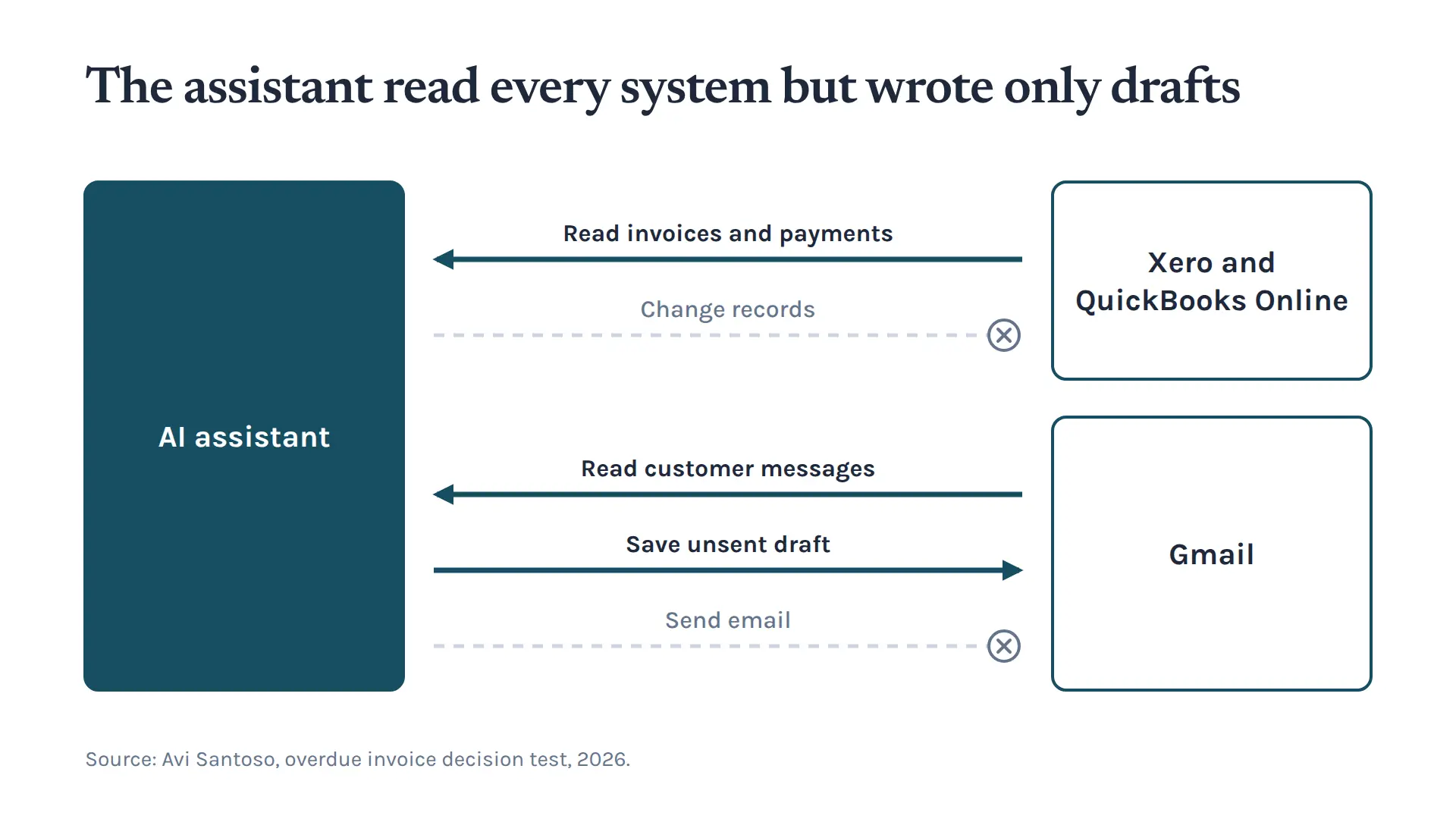
If Gmail had no previous thread from that customer, the assistant refused to create an unaddressed draft and routed the account to a person for manual review. No email was sent, and no accounting or dispute record was changed during any review.
Where an existing unsent draft still matched the latest evidence, the assistants reused it.
What the Results Mean for Receivables Automation
The test results show how a commercial trade or service business can handle accounts receivable automation safely:
- Separate the decision from the send. The assistant prepares each decision and draft, and the owner approves every message before it goes out.
- Route tasks by business role. Split receivables work into specific tasks for specific people. Accounts handles verification and allocation, the service manager handles disputes, and the owner handles follow-ups.
- Pursue undisputed amounts. When an invoice is partly disputed, keep the undisputed portion moving while the service manager investigates the rest.
- Use the five questions above, in that order, before counting days overdue.
When decisions follow a consistent order and require human sign-off, receivables automation turns a list of overdue invoices into a queue of decisions, each with an owner and its evidence.
Get the Next Receivables Automation Report
Join the email list to get the next test, where we run assistants on more businesses, credit notes and longer payment plans, and see what they mean for your own collections.
Keep up with what I'm working on
I'll send you occasional emails about new articles, tools and offers that could help with your business.