Xero, Hubdoc and Dext: How Accurate Are Automated Invoice Processing Systems?
How accurate is automated invoice processing? We tested Xero, Hubdoc and Dext across 20 invoice files and explain the checks behind a review-ready draft bill.
Article Summary
- 01
Xero, Hubdoc and Dext captured all 18 Australian invoice totals correctly, but their results differed for GST, due dates and purchase lines.
- 02
All three tools recorded the Australian-dollar reference total instead of the Japanese-yen amount due on the overseas invoice, so currency needs its own review check.
- 03
A review-ready draft bill should keep the source invoice and email with completed checks for dates, GST, currency, totals, purchase lines and possible duplicates.
One business paid almost €19,000 twice for the same service 1.
The mix-up started when the supplier resent an invoice. The automated system picked up the purchase-order number instead of the invoice number. So, when the second copy arrived, the accounting system treated it as a separate bill, and the business paid twice for the same service.
Could this happen in your business too? It can.
Most business owners and finance teams have turned to automated invoice processing to help them process supplier invoices faster. The software can read the details from an invoice and prepare a draft bill in the accounting system 2.
For the draft bill to be useful, the details need to match the source document. The invoice number needs to identify the right bill. The currency, GST, total, due date, and purchase lines need to reflect what the supplier actually sent.
That’s why invoice capture accuracy matters. One incorrect detail can turn a resent invoice into a separate bill and lead to a duplicate payment.
That’s what we wanted to test. We gave Xero, Hubdoc, and Dext the same set of supplier invoices to see how accurately they captured the details that matter.
The Test: 3 Tools, Same Invoices in Two Formats
To see how accurately invoice capture tools could read supplier invoices, we created 10 invoice templates based on the types of purchases a business might make. Nine were Australian invoice layouts, while one was a Japanese equipment invoice with payment due in yen.
Each invoice began as a digital PDF. We then created a second version as a scan-like PNG image with added scanning artefacts. This gave us two versions of each invoice and 20 documents in total.
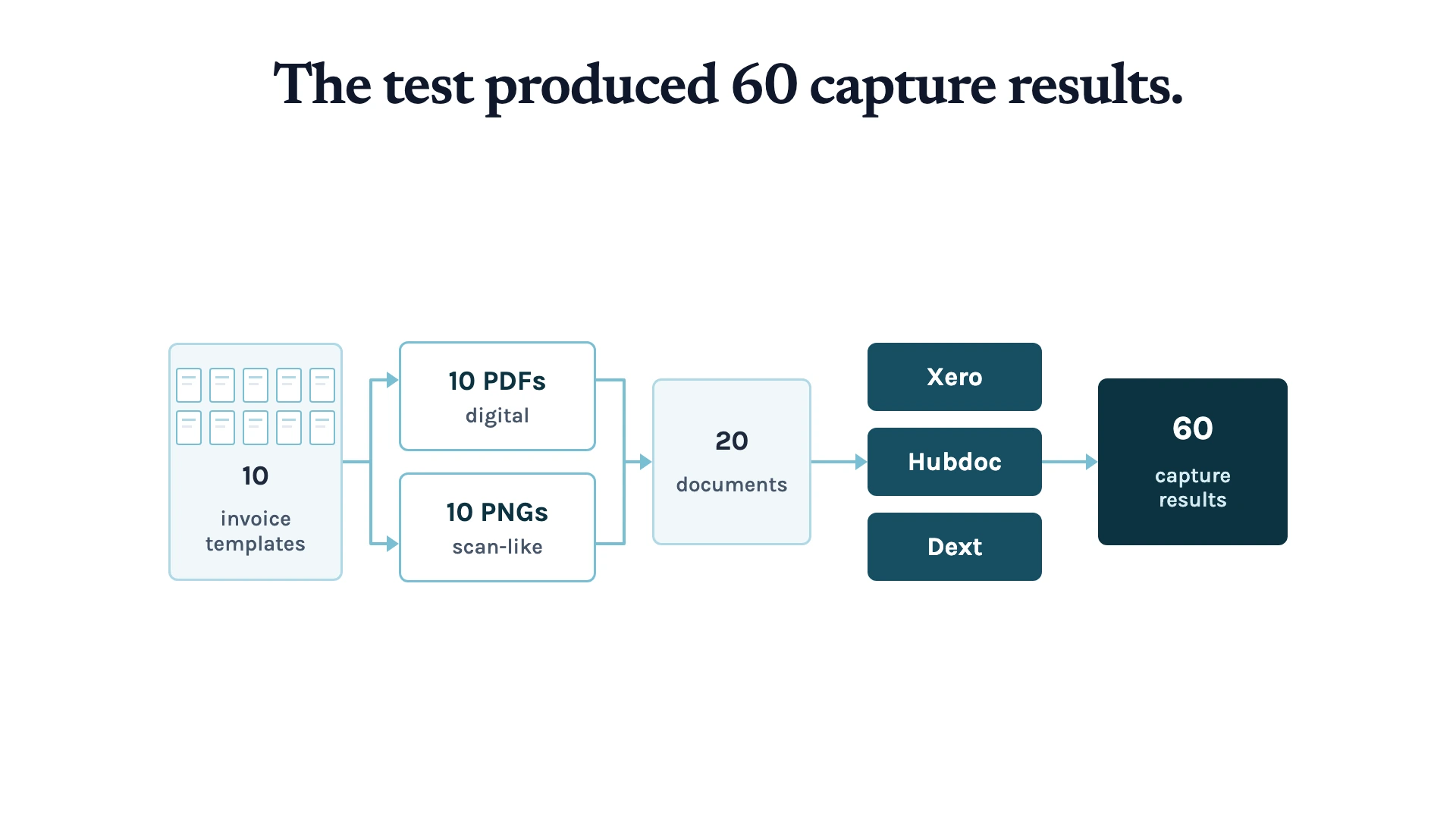
We then submitted every document to the invoice capture tools in Xero, Hubdoc, and Dext. This produced 60 results, which we compared with the original invoices.
For each result, we checked the supplier, invoice number, dates, GST, currency, total, and individual purchase lines.
Here’s what we found:
| Detail checked | Xero | Hubdoc | Dext |
|---|---|---|---|
| Australian totals (18 documents) | 18/18 correct | 18/18 correct | 18/18 correct |
| Australian GST (18 documents) | 0/18 correct | 18/18 correct | 18/18 correct |
| Due dates (20 documents) | 17/20 correct | 20/20 correct | 9/20 correct |
| Purchase details | Several items were combined into one blank line | Individual item details were largely absent | Individual items and amounts were usually retained; amounts balanced in 17/20 results |
The totals were actually a good start. Each tool could read the final amount on the Australian invoices. The next fields showed how much more information sits inside a bill.
Due dates gave us a clear example. Dext captured nine of the 20 due dates correctly and often read the invoice issue date as the payment deadline. That changes when a finance team follows up with a supplier or plans the payment.
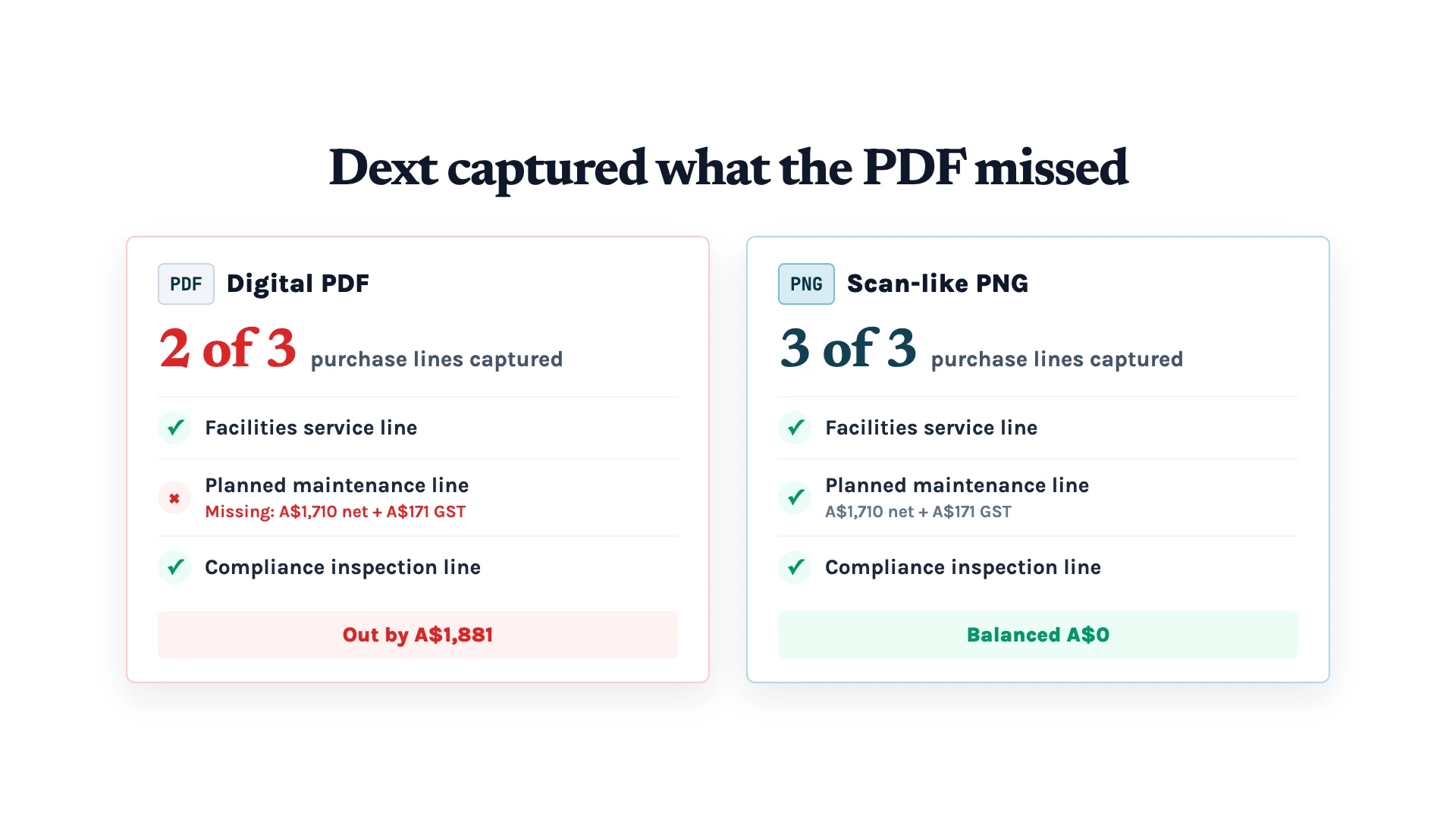
Purchase lines gave us another example. On one facilities services PDF, Dext missed a maintenance line worth A$1,881. When we tested the scan-like version of the same invoice, it captured all three purchase lines and the amounts balanced.
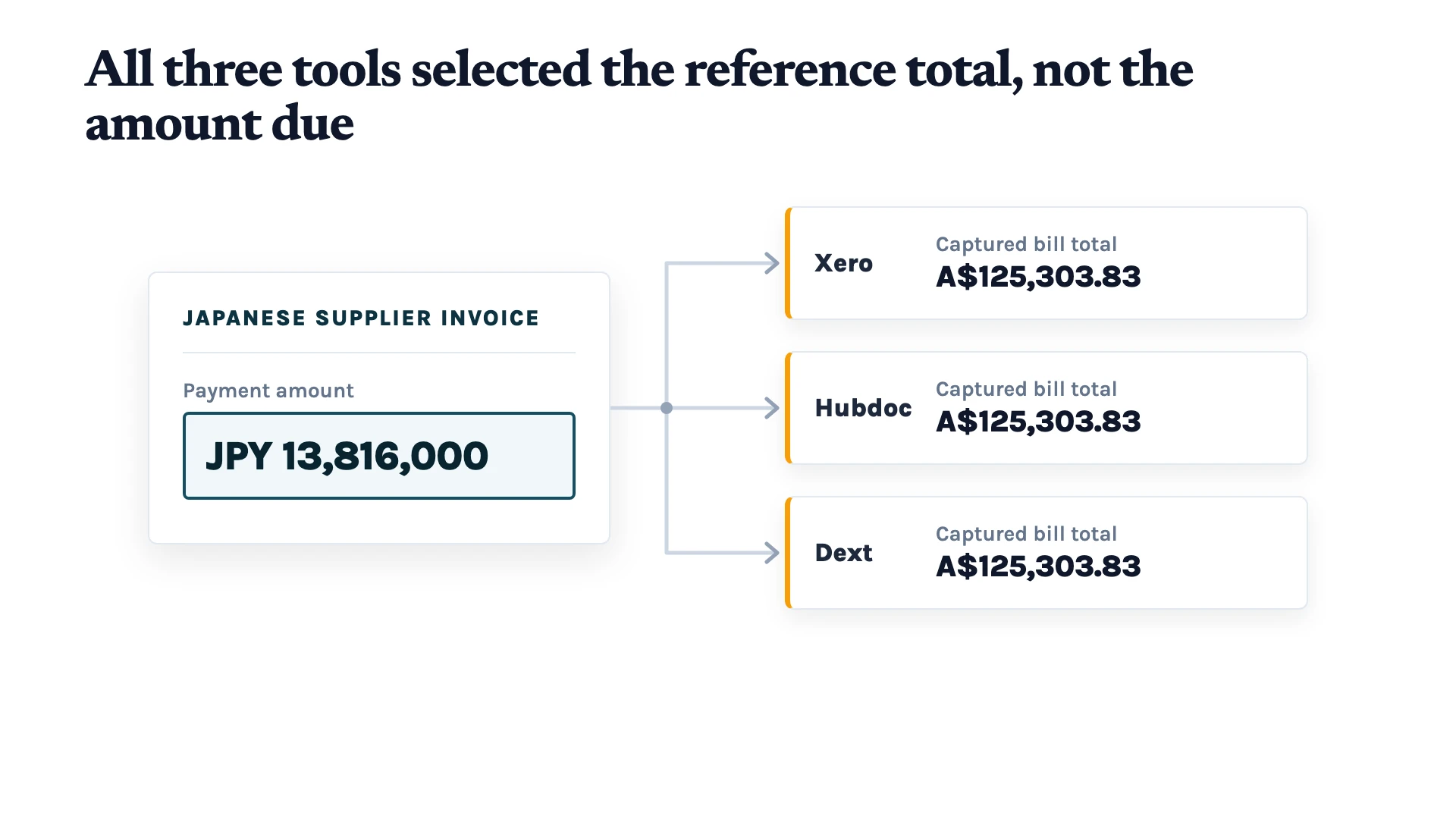
Currency also needs its own check. The Japanese supplier asked to be paid JPY 13,816,000, while all three tools recorded the A$125,303.83 reference total as the bill total. Dext also treated item prices written in yen as Australian dollars.
An accurate invoice record gives the reviewer both the total and the context around it: the tax, due date, currency, supplier, invoice number, and details of what the business is paying for. That’s the information they need before approving the bill.
A Draft Bill Needs Its Evidence
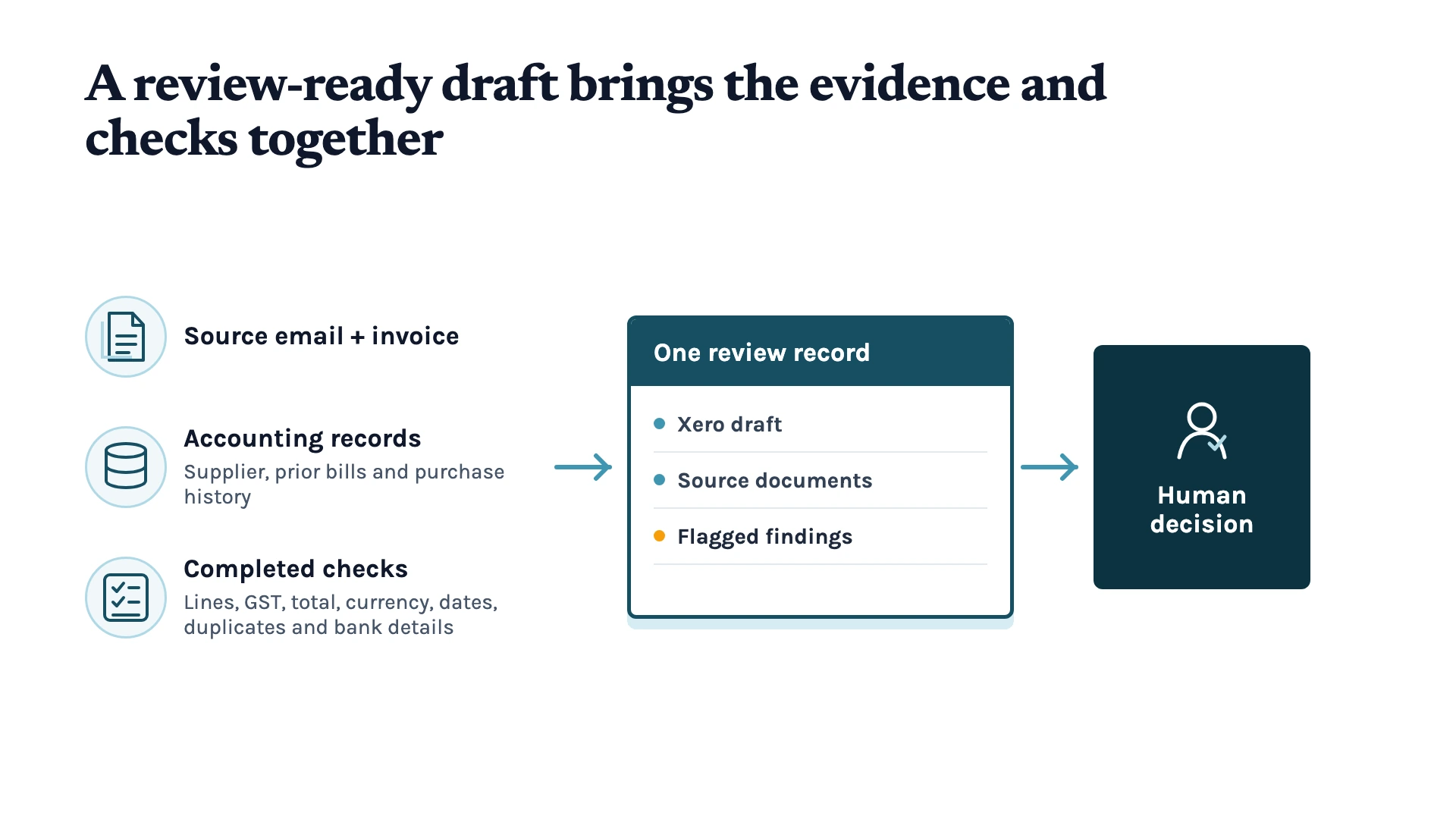
Once we compared the results, the next part became clear. An accurate invoice process brings together the original invoice, the records already in the accounting system, and the checks that help a person review the draft bill.
It starts with the source files. Keep the original invoice with the email it came from, along with any related messages or revised copies. This gives the reviewer the context behind the bill, including whether the supplier has sent a correction or replacement.
Next, bring in the records the business already has. This can include the supplier contact, purchase details, earlier invoices, how similar expenses were coded, and any contract that explains what the business expected to pay.
Then, run the checks. Compare the purchase lines, GST, and total. Check that the currency and dates match the invoice. Look for possible duplicates by comparing the supplier, invoice number, dates, and amounts with bills already in the system 3. If the supplier’s bank details have changed, flag the bill for verification before it moves forward.
The reviewer should then see the draft bill, original documents, completed checks, and any findings that need attention in one place. That gives them the information they need to decide whether the bill is ready for approval.
From Invoice Email to a Draft Bill
After the test, we wanted to see how the same idea could work in a real invoice process.
So we ran a live test using an authorised connection between Codex and Xero. Codex read the document and prepared a draft bill in Xero with the supplier, dates, five purchase lines, GST, and total. It also attached the original PDF to the bill. The draft then stayed in Xero for a person to check and approve.
We also designed an n8n workflow for the wider process. When a supplier sends an invoice by email, the workflow keeps the email and attachment together, reads the invoice details, checks the amounts, and prepares the Xero draft. It then creates a review record so the team can see the source document, the draft bill, and any details that need attention.
For example, bills with an amount mismatch, missing purchase lines, or a due date within seven days can be flagged for review first. That way, the reviewer has the information they need before deciding whether the bill is ready for approval.
A Better Starting Point for Every Bill
Accurate invoice capture gives your team a better starting point for every supplier bill. When the draft bill includes the correct invoice number, GST, total, currency, due date, and purchase lines, the reviewer begins with a clearer picture of what the business is being asked to pay.
The source files, accounting records, and completed checks give them the context to compare those details and decide whether the bill is ready to move forward.
So, if you want to improve how your team captures and reviews supplier invoices, talk to us about your invoice workflow. We can look at how it currently works and see where improvements will make the biggest difference.
References
- Runview (2021). Four cases showing that supplier over-payments are more common than you think. Runview. https://www.runview.fr/en/resources/four-cases-showing-supplier-over-payments-more-common-think
- Xero (n.d.). Connect or disconnect Hubdoc and Xero. Xero Central. https://central.xero.com/0/article/Connect-Hubdoc-to-Xero
- Dext (2026). How Dext handles duplicate Cost documents. Dext Help Centre. https://help.dext.com/en/articles/216124-how-dext-handles-duplicate-cost-documents
Keep up with what I'm working on
I'll send you occasional emails about new articles, tools and offers that could help with your business.