AI Integration with Xero and QuickBooks: A Practical Guide
Explore Xero integration, QuickBooks integration, and bookkeeping automation. Compare AI connectors, MCP servers, CLI tools, and CSV export options.
Watch the YouTube video
Watch on YouTubeArticle Summary
- 01
The research tested eight ways to connect an AI assistant to Xero and to QuickBooks Online, comparing setup effort, access permissions and answers to ten bookkeeping questions with known answers.
- 02
Xero's Claude connector is read-only, while Intuit's can import transactions and send invoices, so the right AI connector depends on whether the assistant only answers questions or also changes records.
- 03
Exporting a CSV from Xero takes less than a minute and needs no live connection, but the file does not update when the accounting records change, so live data needs a direct integration.
Accounting teams are always looking for ways to reduce repetitive work while maintaining control over their financial records. AI assistants have opened up new possibilities for simplifying everyday tasks, from transaction checks to bookkeeping reviews. Yet connecting an AI assistant to your accounting software is not always straightforward.
A good integration with Xero or QuickBooks involves more than simply linking an account. You need to know what data the assistant can access, whether it can make changes, and how much setup is required, as well as whether it can provide accurate answers to bookkeeping questions. A reliable accounting software integration should make these tasks easier without creating additional work for the finance team.
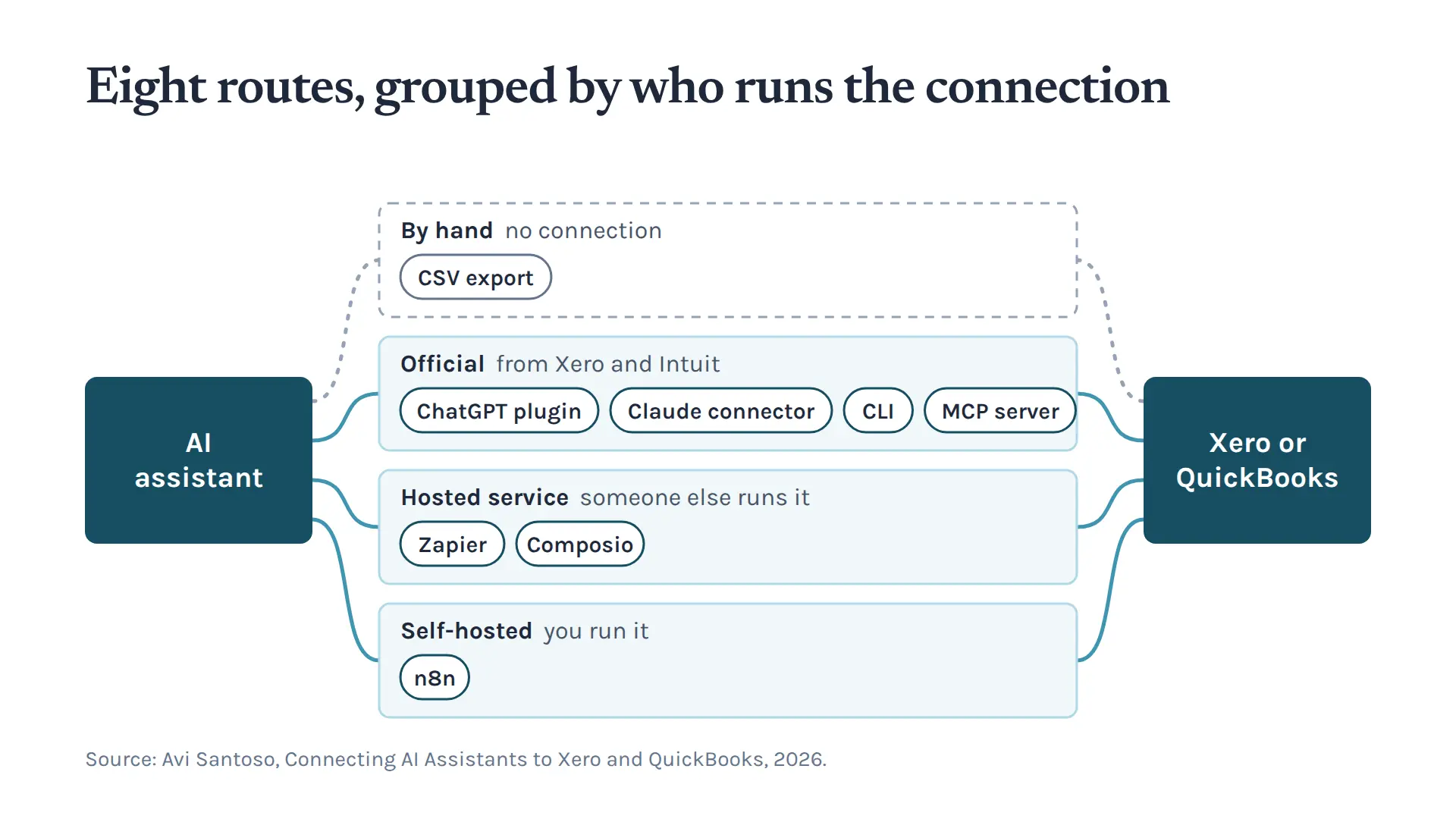
Several ways to connect an AI assistant to Xero and QuickBooks Online include official connectors, command-line tools, Model Context Protocol (MCP) servers, automation platforms, and traditional CSV exports.
In my research, Connecting AI Assistants to Xero and QuickBooks, I have tested these options based on setup requirements, access permissions, and 10 bookkeeping questions with known answers. 1 The research is intended to help internal finance and bookkeeping teams decide which methods are worth considering. It also provides useful information for businesses comparing Xero integration and QuickBooks integration options.
Why Accounting Software Integration is Important for AI Assistants
Finance teams deal with transactions, invoices, and other records in their accounting software every day. Reviewing all that information manually can be time-consuming, especially for firms managing several clients.
An AI assistant connected to the software can make some of that work easier. Instead of searching through files, a professional can simply ask the system a question in plain language. For example, they might want to investigate a transaction or check activity in a particular account. This is one reason accounting software integration is becoming relevant to modern bookkeeping automation.
However, an assistant's usefulness depends on the quality of its connection. An integration that lets users create or import records differs from one that only provides read access. Similarly, a tool that requires extensive technical work may not suit a small practice looking for a simple solution. The goal of AI integration should be to use existing financial information reliably without adding unnecessary risk or complexity. A suitable accounting software integration can also help firms improve their bookkeeping automation processes.
How to Connect AI to Xero and QuickBooks
The research examines different ways to connect AI assistants to these two systems. Broadly, the options include direct connections, automation tools, and manual exports. Businesses evaluating Xero integration should also consider how the available methods compare with QuickBooks integration before choosing a solution.
1. Official AI Connectors
These connectors let an AI assistant connect directly to an accounting platform. Our research reviewed the Claude connectors and ChatGPT plugins from both Xero and Intuit. Intuit's own versions are available to US customers only, so for our Australian QuickBooks company we tested Meridian's third-party connector instead. 1 The distinction between the official connectors comes down to access. Xero's Claude connector is read-only; the assistant can see the information but can't alter the accounts. 2 Intuit's side is more feature-rich, allowing transaction imports and invoice sending. 3
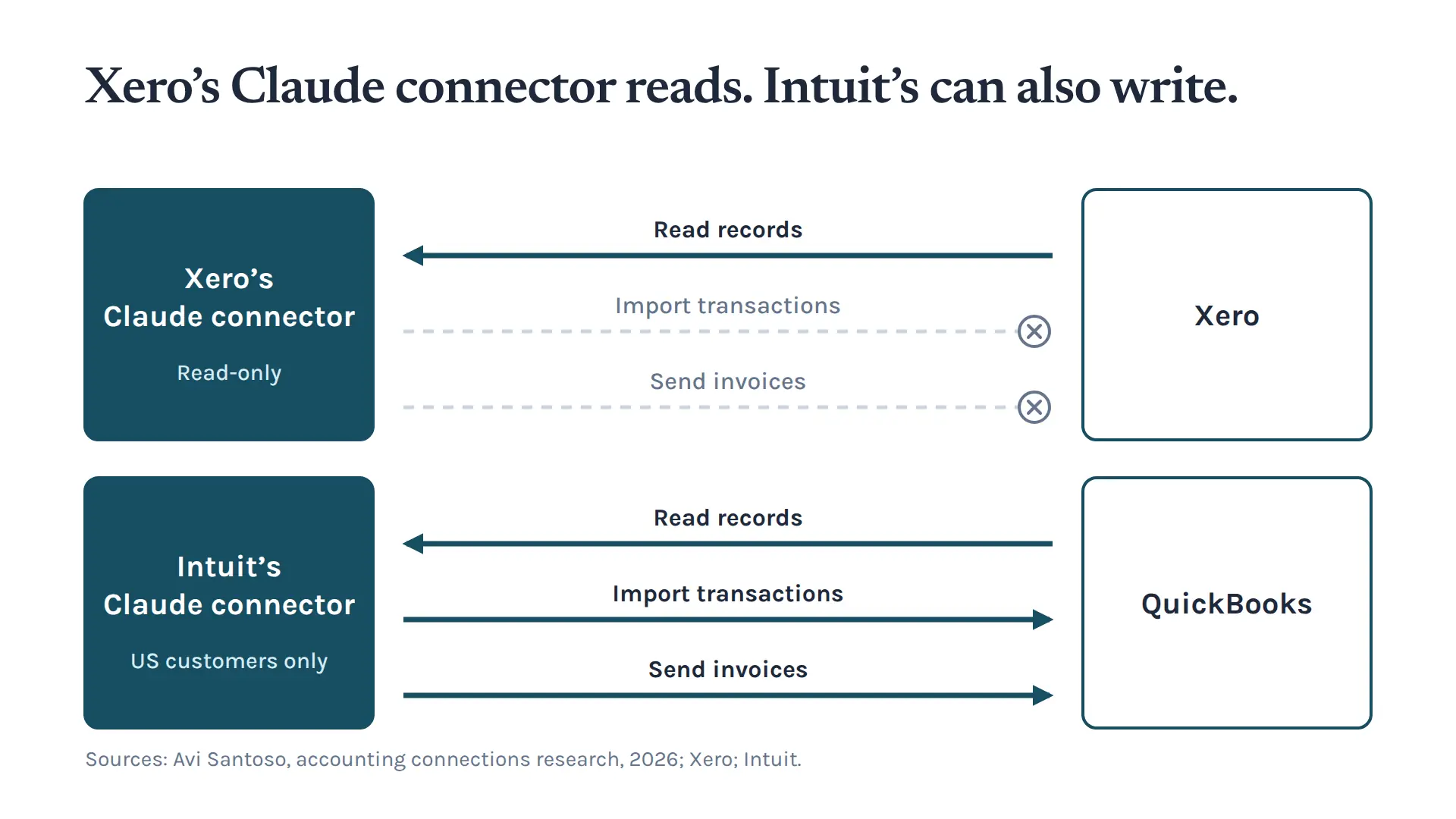
An accounting firm will have to decide what is right for it based on the assistant's role. Read-only access is sufficient if you only want to ask questions about existing records. But when write access is needed, as when a team has to import transactions or put together an invoice, it becomes essential.
While convenience is a factor, so are permissions. An assistant having access to financial data is no reason to let it make changes unbidden. Such differences in access will inform whether the Xero or QuickBooks integration is the better fit.
2. Model Context Protocol (MCP) Servers
MCP offers an alternative way to link an AI assistant to an outside application. We have covered the official MCP server options for Xero and QuickBooks in our research. Xero hosts its MCP server, so there is no server software to install, although connecting a real company needs a paid Xero developer plan. Intuit's MCP server is open-source software you run yourself. 1 Either way, it lets bookkeepers manage their finances through conversation with the assistant.
What the assistant can do is a matter of how the server is configured and the permissions in place. Firms should be clear on what their MCP setup entails. This could appeal to a business looking for a more flexible workflow, though it is more technical than simply exporting a file. For those mulling over a QuickBooks integration, the MCP servers are an option to look at in addition to what is on offer from Xero.
3. Command-Line Tools
The research extends to command-line interfaces (CLIs), including the official ones for Xero and QuickBooks. Both are new: Xero released its CLI in March 2026 and Intuit released its CLI in May 2026. 4 5 A business may find them useful to have more say in how the AI assistant engages with the accounting software. Here, the assistant is directed by commands instead of a graphical interface.
This isn't the most straightforward path for everyone in the profession. You have to consider the configuration and technical demands before proceeding. CLIs are better suited to firms with technical support on hand or those that want to build customised workflows.
4. CSV Export
A live connection is not necessary for every accounting software integration. CSV exports offer a simple alternative. Instead of connecting an AI assistant directly to Xero or QuickBooks, users can export their accounting information and upload the file for analysis.
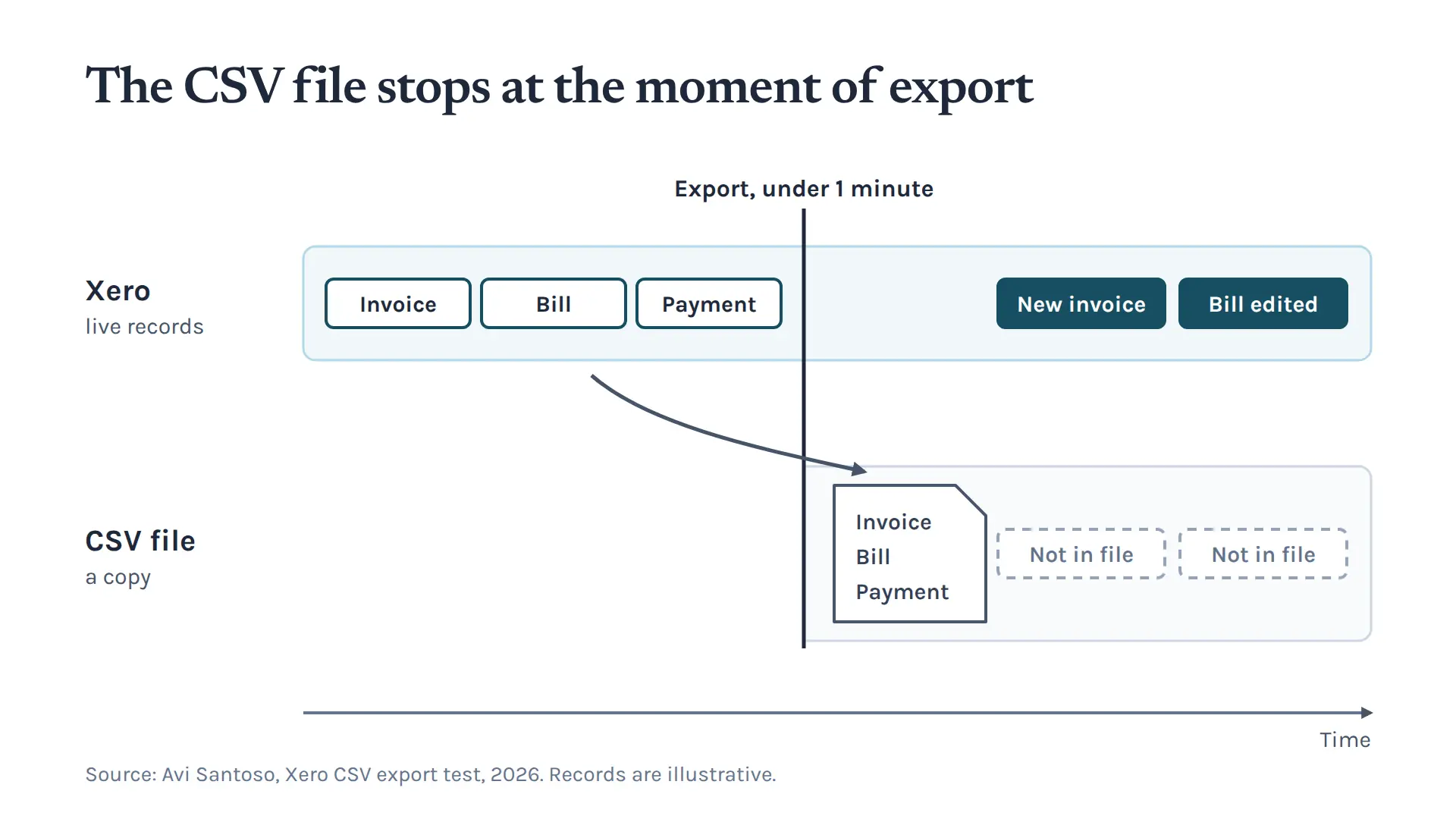
The research shows that exporting a CSV from Xero takes less than a minute, making it an easy way for accounting professionals to start using AI without setting up a technical connection. 1 For businesses that don't need a live Xero or QuickBooks integration, this approach can be a practical starting point.
The main advantage is simplicity. Users can review exported data without giving an AI assistant direct access to their accounting system. This approach also helps firms working with clients on different accounting platforms. Reviewing CSV files in a consistent format provides a standard way to analyze financial information. It can also support bookkeeping automation by making routine data reviews easier to manage.
The downside is that the data is not updated automatically. Any changes made to the accounting records will not appear in the exported file, so users need to create a new export. This works well for occasional bookkeeping reviews or data analysis. However, teams that need ongoing access to current information would benefit more from a direct integration.
Other Accounting Automation Platforms Worth Considering
The research also tests several third-party tools to see how well they connect accounting software with other applications. These include Zapier, Composio, and n8n. Such platforms can also support accounting software integration by connecting different business applications and automating routine tasks.
Zapier
Both Xero and QuickBooks support Zapier as an integration option. It allows different applications to work together and helps businesses create automated workflows. When a process requires sharing information across several business tools, Zapier can help accounting teams. It may also help businesses extend their bookkeeping automation beyond their main accounting platform.
Composio
The research also includes Composio. Teams exploring how AI assistants can connect with external applications may want to consider it when building automated accounting workflows.
n8n
The study also covers n8n for both accounting platforms. It is an automation platform for businesses that want to create custom workflows around their existing processes and connect different applications.
These platforms do not offer exactly the same features. The right choice depends on the workflow, as permissions, available integrations, and setup requirements can vary.
Xero Integration vs QuickBooks Integration: What Should You Consider?
Choosing an integration method isn't always easy for accounting firms with clients on different platforms. A firm managing some clients on Xero and others on QuickBooks needs to decide whether to use a common process for reviewing exported files or set up separate live connections for each platform.
Both approaches have advantages and disadvantages. A live connection provides more direct access to financial information but requires a clear understanding of the platform's permissions and setup process.
A CSV approach is simpler and makes it easier to review information consistently, although the data must be uploaded rather than accessed in real time. Comparing Xero integration and QuickBooks integration can help firms decide which approach works best across their client base.
The best approach depends on the team's technical capabilities, what it expects the AI assistant to do, and how often it needs access to the information. Consider these questions before making a decision:
- Is the assistant only expected to read accounting information?
- Do you need to create invoices or import transactions?
- Do you require a live connection?
- How much technical setup can the team manage?
- Does the workflow need to support both Xero and QuickBooks?
- Are the necessary permissions in place?
These questions help narrow down the options. The most technically advanced integration is not always the best choice.
How the Research Tested the Different Connection Methods
One of the research's most useful aspects is its focus on practical testing rather than simply listing available integrations. The study tests eight connection methods on each system and asks ten bookkeeping questions with known answers. 1 Each option is compared across three areas: accuracy when answering those questions, access permissions and the time and effort required for setup.
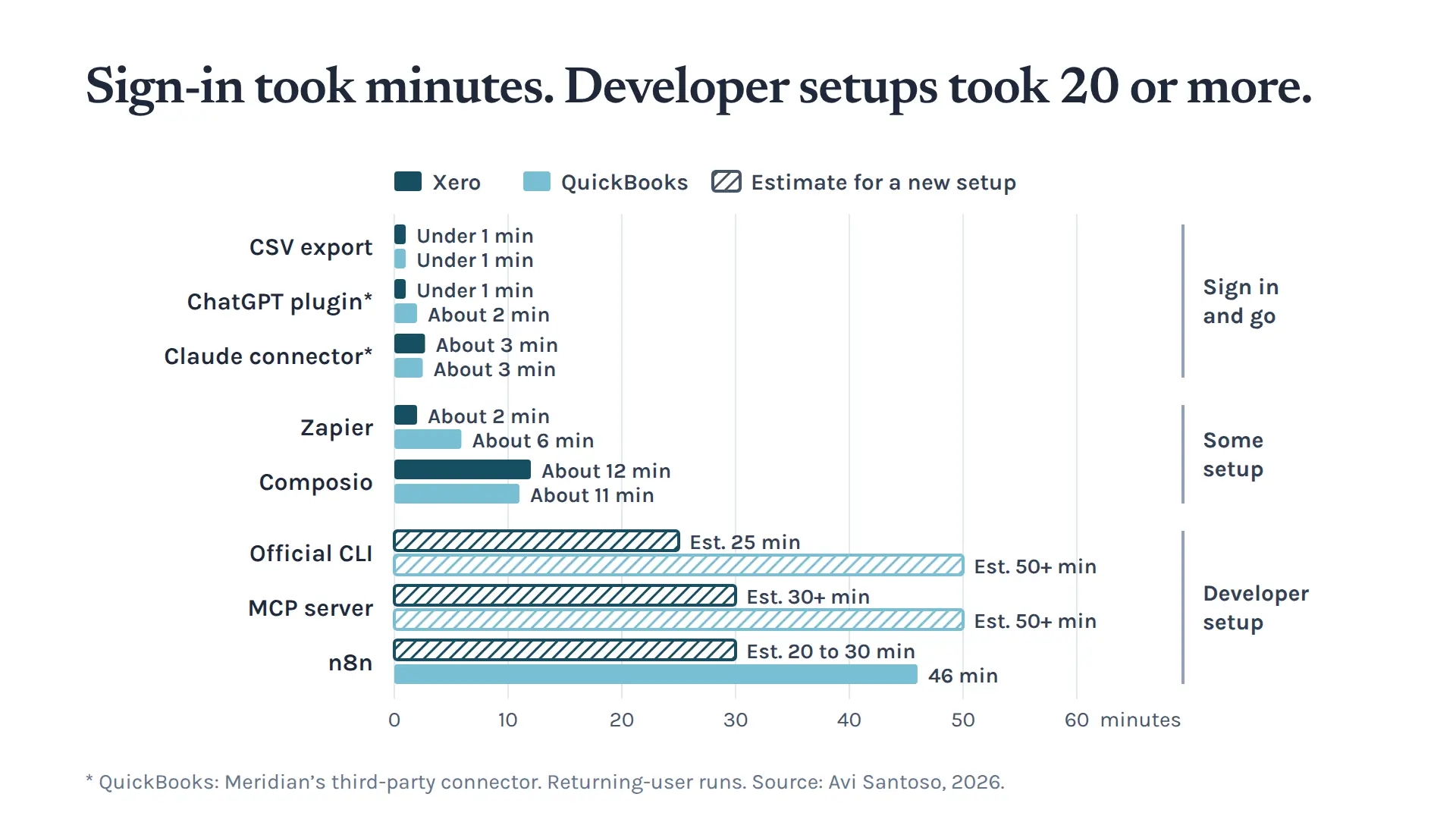
This matters because an integration that looks promising on paper may require more work from an accounting team than expected. The access comparison examines what each method can read, create, update or delete in Xero and QuickBooks. These differences are particularly important when working with financial information.
To test the connections, the experiment asks each one to answer ten bookkeeping questions with known answers. This provides a practical way to check whether an AI assistant can handle accounting information accurately. Rather than judging an integration simply by whether it is available, the research looks at how well it performs in real bookkeeping situations.
Although the research summary explains these testing criteria, the full report includes the individual setup times, plan requirements, and scores for each question. For a detailed performance comparison, refer to the comprehensive research.
Which Accounting Software Integration Approach Is Right?
No single integration method works for every accounting firm. A small bookkeeping business might prefer CSV exports because they are quick to prepare and do not require a live connection. A larger firm with more complex workflows may benefit from official connectors, MCP servers, or an automation platform.
The right choice depends on the task. An exported file may be enough for an occasional bookkeeping question, but teams that regularly need up-to-date figures may find a direct connection more useful. When a workflow involves creating or importing financial records, permissions matter even more because read-only access doesn't allow you to add or change information in the system.
Another important factor is who will manage the integration. A technical setup that works well for one business may create unnecessary work for another. Firms using both platforms should also consider consistency.
Reviewing CSV files through a shared process can help standardise work, while maintaining separate workflows may increase administrative burden. The research provides a useful starting point by comparing the available methods rather than assuming that every integration works in the same way.
Practical Bookkeeping Automation
AI can make accounting information easier to access and review, but choosing the right connection is only one part of the process. Before introducing a new workflow, firms should identify their most repetitive and time-consuming tasks and decide whether they require read access, write access, or simply an exported file. This can help businesses make better decisions about bookkeeping automation and avoid investing in tools they do not need.
It is also important to understand the limitations of each option. A read-only connector cannot create invoices, and a CSV export does not provide live access to financial records. Automation works best when it supports a clear, well-defined process. Applying an integration to a specific task also makes it easier to measure whether it is actually saving time. A well-planned accounting software integration can make bookkeeping automation more practical by reducing manual work while keeping financial records accessible.
For internal finance teams and accounting firms, the goal is not simply to add another AI tool. It is to improve how financial information is accessed, managed, and reviewed. Whether a business chooses Xero integration, QuickBooks integration, or a combination of both, the focus should remain on reliable access, appropriate permissions, and useful bookkeeping automation.
Watch the matching video to see how AI assistants connect with Xero and QuickBooks and how these integrations can improve everyday workflows. Join my email list for more research, practical insights, and ideas on automation and process improvement.
References
- Avi Santoso (2026). Connecting AI Assistants to Xero and QuickBooks. Avi Santoso. https://www.avisantoso.com/resources/accounting-connections
- Xero (2026). Xero and Claude. Xero. https://www.xero.com/us/ai-in-accounting/claude/
- Intuit (2026). Use Claude to enter transactions and get insights in QuickBooks. QuickBooks Support. https://quickbooks.intuit.com/learn-support/en-us/help-article/accounting-and-bookkeeping/use-claude-enter-transactions-insights-quickbooks/L7Y1PJAEx_US_en_US
- Xero (2026). xero-command-line. GitHub. https://github.com/XeroAPI/xero-command-line
- Intuit (2026). Intuit CLI for QuickBooks. GitHub. https://github.com/intuit/intuit-cli-for-quickbooks
Keep up with what I'm working on
I'll send you occasional emails about new articles, tools and offers that could help with your business.