Beware Bank-Detail Change Fraud: Catch It Before Payment
Learn how to catch payment redirection fraud before payment by detecting bank-detail changes and verifying them through an independent contact method.
Article Summary
- 01
Treat every supplier bank-detail change as a review event before the supplier enters the payment run.
- 02
Monitor email, invoice attachments and Xero supplier records because changed bank details can enter through any of them.
- 03
Hold the payment and have a second person verify the change through contact details recorded before the request.
In 2024, Australian businesses reported A$152.6 million in losses from payment-redirection scams, and over the past five years, the highest reported loss was A$227 million in 2021. 1 2 These aren’t small amounts at all.
The numbers show that payment-redirection fraud is a real risk for Australian business, and it’s something you can’t afford to ignore because what makes this type of fraud even more concerning is how legitimate the payment can look.
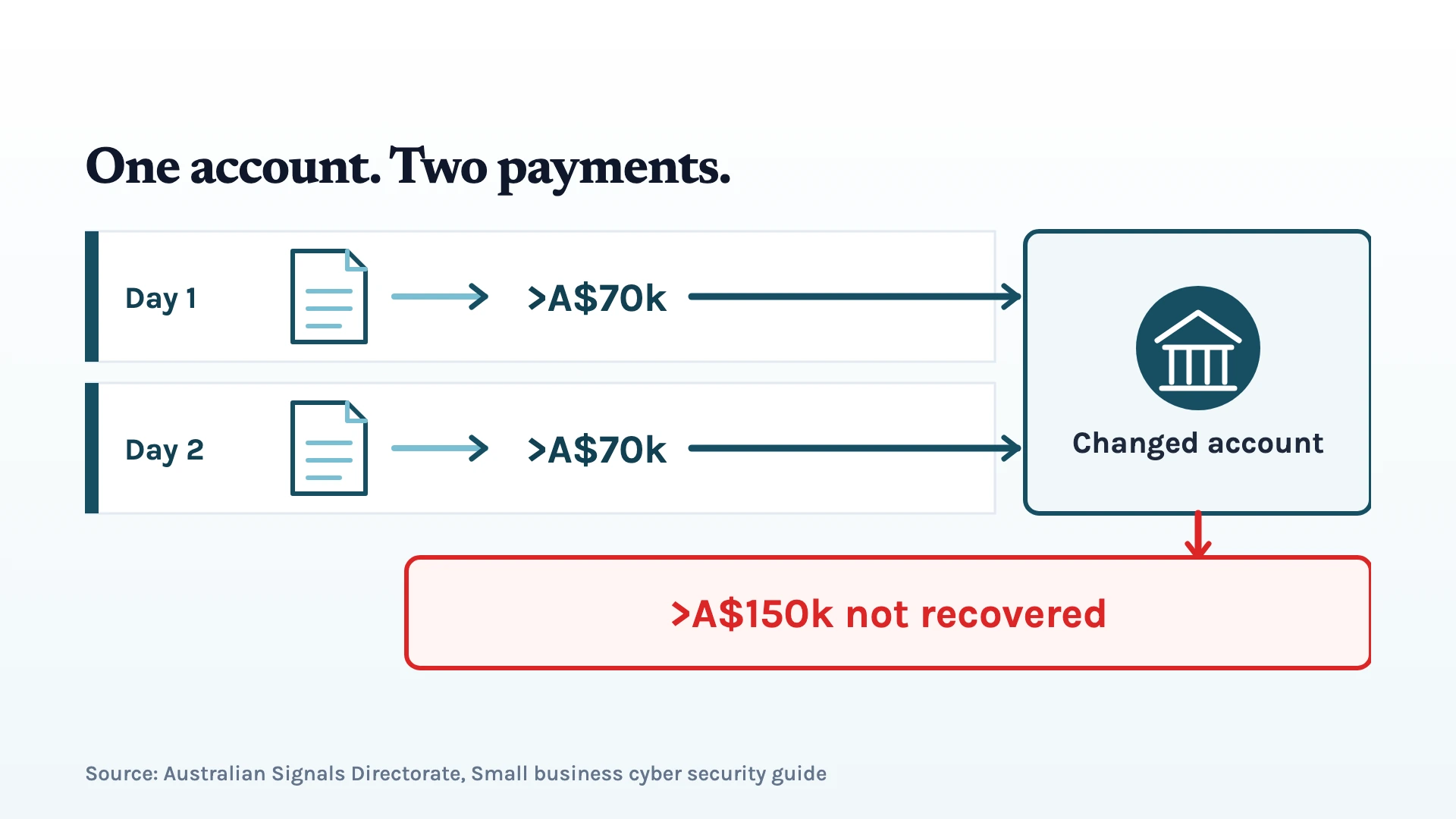
In one case, a small construction company received changed bank details from a supplier’s hacked email account. 3 The payment request looked legitimate, with the existing email trail making it appear to come from the supplier they already worked with. The only thing that had changed was the bank account receiving the payment.
So, the company paid more than A$70,000 to the altered bank account.
Then the very next day, another employee paid the same invoice again, sending another A$70,000-plus to the changed account. In total, more than A$150,000 was sent, and none of the money was recovered. 3
At first, it might seem like a simple case of human error or a gap in the payment workflow. But when a payment request comes through a genuine supplier’s compromised email account and looks consistent with the existing conversation, spotting the change isn’t always as straightforward as it sounds.
The real problem in this case was simple: the business was just trying to pay its genuine supplier, but the payment had been redirected before it reached the supplier: twice.
So, how can a business catch a bank-account change before payment goes out without manually checking every invoice?
Can Your Existing Tools Catch a Bank-Detail Change?
Most businesses already use tools such as Xero, Hubdoc, or Dext to manage supplier records, invoices, and payment information. But when a supplier's bank details change, what do these tools actually do to help you spot the change?
So, we tested these three tools to see how they handle supplier identity and payment data. Here's what we found:
- Xero: Records the old and new bank details after an edit, but the tested workflow didn't require a second person's approval. The email alert also went to the person who made the edit.
- Hubdoc: Didn't display bank details in the tested capture and publish screens.
- Dext: Could flag an invoice where the numbers didn't add up, but accepted a valid Australian Business Number that belonged to a different entity.
The results showed that each tool can check or record parts of the information, but that doesn’t necessarily mean they can confirm that a new bank account actually belongs to the supplier. More importantly, none of the tested flows produced a hard stop for the bank-detail change.
That distinction matters because a genuine invoice can include valid supplier information and correctly formatted bank details, yet still send payment to the wrong account.
The missing control is an alert that identifies a changed payment destination and prompts someone to verify it before payment.
Instead of Checking It Manually…
You can set up an automated check to look for changes in the payment destination across supplier records and invoices. If you're running a finance team or firm and dealing with tons of records and invoices, manually checking every change can take too much time.
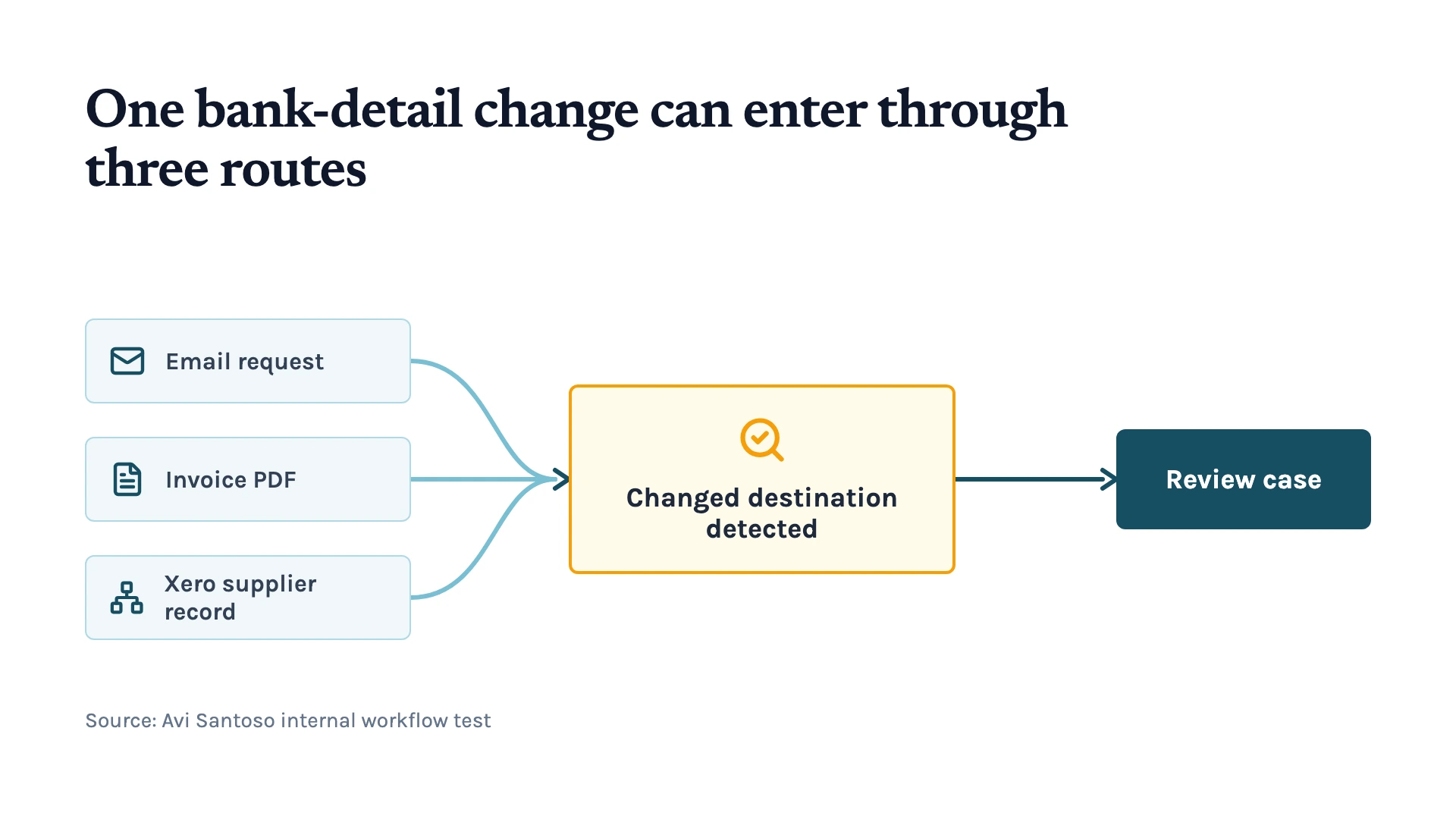
Also, a supplier's new bank details don't always arrive in the same way. They can appear in an email, inside an invoice PDF, or be changed directly in the supplier record.
That means checking only one part of the process can leave a gap.
So, we tested two n8n workflows that watch different routes into the payment process. One checks incoming emails and invoice attachments, while the other checks supplier bank details directly in Xero.
When either workflow detects a change, it compares the new details with the supplier information already on record, creates a review case, and sends an alert to staff.
But again, detecting a change is only useful if the checks can catch the different ways payment-redirection fraud can happen.
That's why we tested the workflows against six scenarios, from an obvious fake request to cases where the sender, email thread, or supplier record appeared genuine.
So, Did the Checks Catch the Bank-Detail Changes?
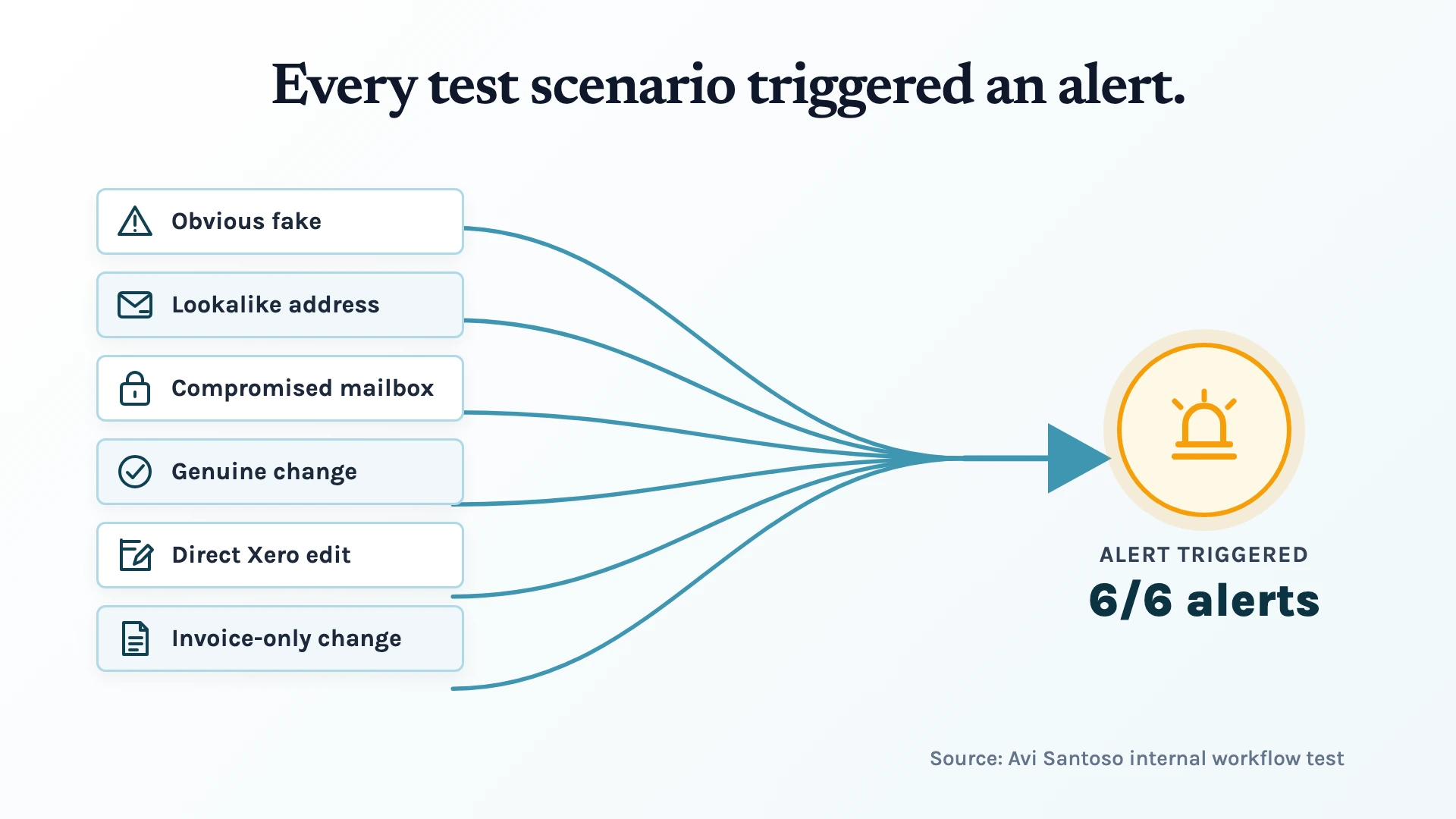
The checks generated an alert for all six scenarios we tested. That included cases where the email account or supplier record appeared genuine.
And these are the scenarios we covered:
- An obvious fake request: The sender, phone number, and bank details were all changed.
- A lookalike email address: The request came from an address designed to look like the genuine sender.
- A compromised supplier mailbox: The request came through a genuine email account and existing thread.
- A genuine bank-detail change: The supplier really did request a change, so the request itself looked legitimate.
- A direct Xero edit: The bank details were changed directly in the supplier record without going through email.
- An invoice-only change: The new bank account appeared inside the invoice PDF rather than the email body.
The more convincing scenarios were the important test. A compromised supplier mailbox, for example, can make the email, sender, and existing conversation look genuine. The automation still detected that the payment destination had changed compared with the supplier information on record.
So the checks worked, even when the request looked legitimate. But there was one important limitation: an alert doesn't stop the payment.
After each alert, your finance team still had to remove the supplier from the payment batch and verify the bank-detail change before the payment could go out.
The Verification Should Happen Outside the Original Request
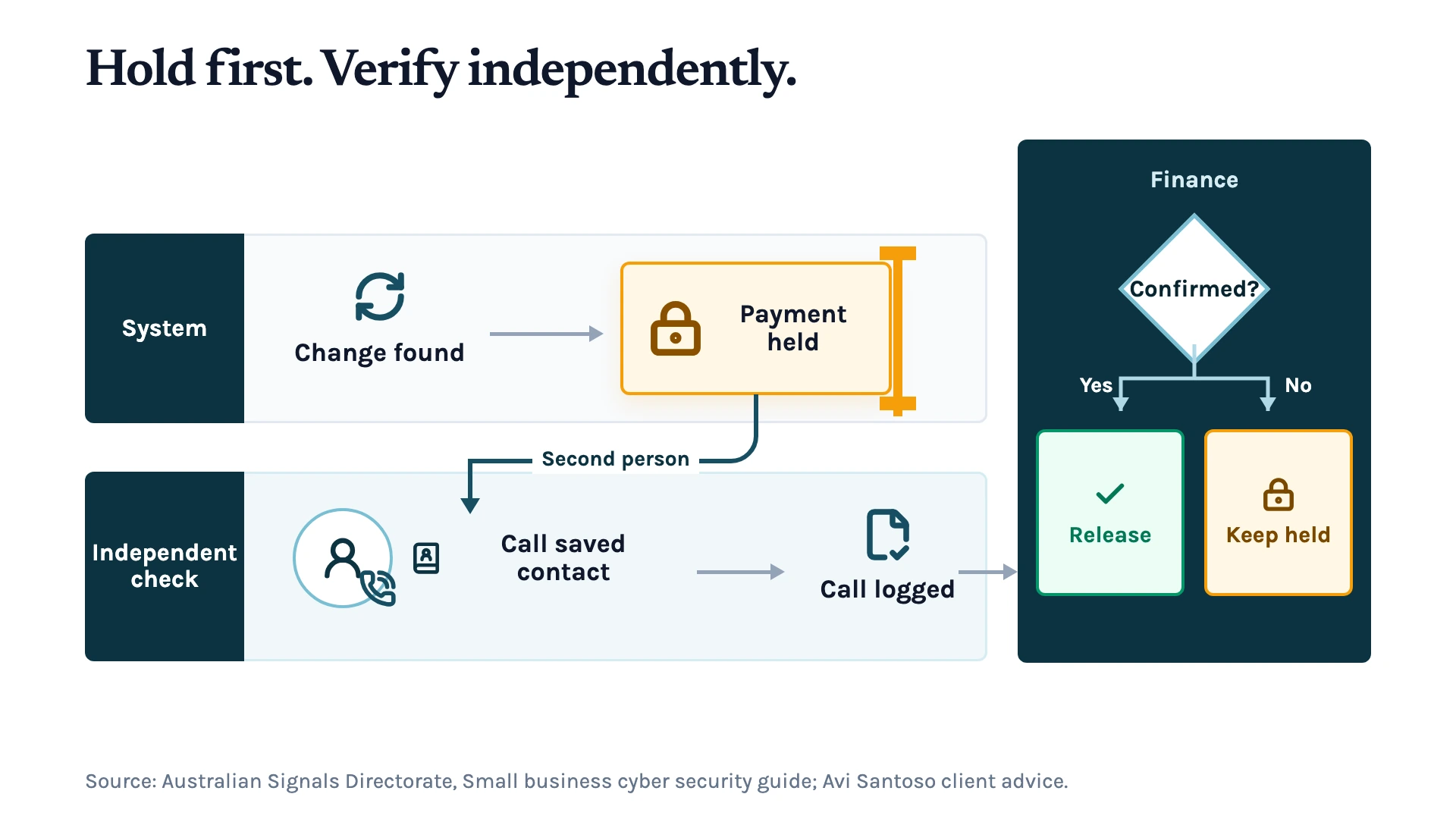
Once the payment is on hold, we advise our clients to have a second person verify the change. That person should contact the supplier using a phone number or other contact method recorded before the request, then record the outcome. 3
A compromised email account can make the request, sender, and existing conversation look genuine. Using the saved contact method provides an independent check.
Finance can release the payment once the supplier confirms that it authorised the change and owns the new account. Otherwise, the payment stays on hold until the change is verified.
So the control isn't just:
Change detected → alert sent
It's:
Change detected → payment held → independent verification → outcome recorded → Finance decides whether to release the payment.
Before the Next Payment Run, You Need to Change This
Make every bank-detail change a review event, wherever it appears. The check should flag the change, preserve the evidence, and alert Finance before the supplier enters the payment run.
Then, make sure the alert leads to an actual payment hold and independent verification.
The important part is that a bank-detail change shouldn’t go straight into the payment run just because the request looks genuine. Even a genuine email account or familiar conversation doesn't confirm that the new bank account belongs to the supplier.
So, if you're not sure where your current payment process leaves room for this kind of risk, let us help. You can book a consultation with us, and we’ll take a look at your current workflow, map where the payment destination can change, and work out what needs to happen when it does.
References
- National Anti-Scam Centre (2025). Targeting scams: report of the National Anti-Scam Centre on scams data and activity 2024. Scamwatch. https://www.scamwatch.gov.au/system/files/targeting-scams-report-2024.pdf
- Australian Competition and Consumer Commission (2022). Payment redirection scams cost Australian businesses $227 million last year. ACCC. https://www.accc.gov.au/media-release/payment-redirection-scams-cost-australian-businesses-227-million-last-year
- Australian Signals Directorate (2025). Small business cyber security guide. Cyber.gov.au. https://www.cyber.gov.au/business-government/small-business-cyber-security/small-business-hub/small-business-cyber-security-guide
Keep up with what I'm working on
I'll send you occasional emails about new articles, tools and offers that could help with your business.