Can AI Agents Work Properly With More Tools?
Can AI agents handle dozens of tools without making mistakes? See what our experiment with 3 to 48 AI agent tools found.
How many tools does your company use for daily operations? Five? Ten? Or even more than that?
And how many of those tools does your AI agent have access to?
There are many different tools available, and as AI becomes more integrated with business and professional tools, AI agents can now access more of them to help with different operational tasks.
This became even more interesting after Anthropic introduced a tool-search approach that allows an AI agent to keep a large library of tools available without loading every tool definition into its context at once. The idea is simple: instead of giving the AI every tool description upfront, it can search for the tools it needs when they become relevant.
Let’s say a bookkeeping firm has many different tools available. After giving access to their AI agent, they can ask the AI to parse files, convert PDFs, process CSVs, or even connect with systems such as their CRM or Xero.
That’s a good way to make use of what an AI agent can do. However, it raises an interesting question: could having access to too many tools make it more likely to choose the wrong action?
For example, if several tools can perform similar tasks but lead to very different business outcomes, could the AI choose the wrong one?
So, we ran an experiment to find out how much the number of available tools actually affects an AI agent’s performance.
Does Tool Count Affect AI Performance?
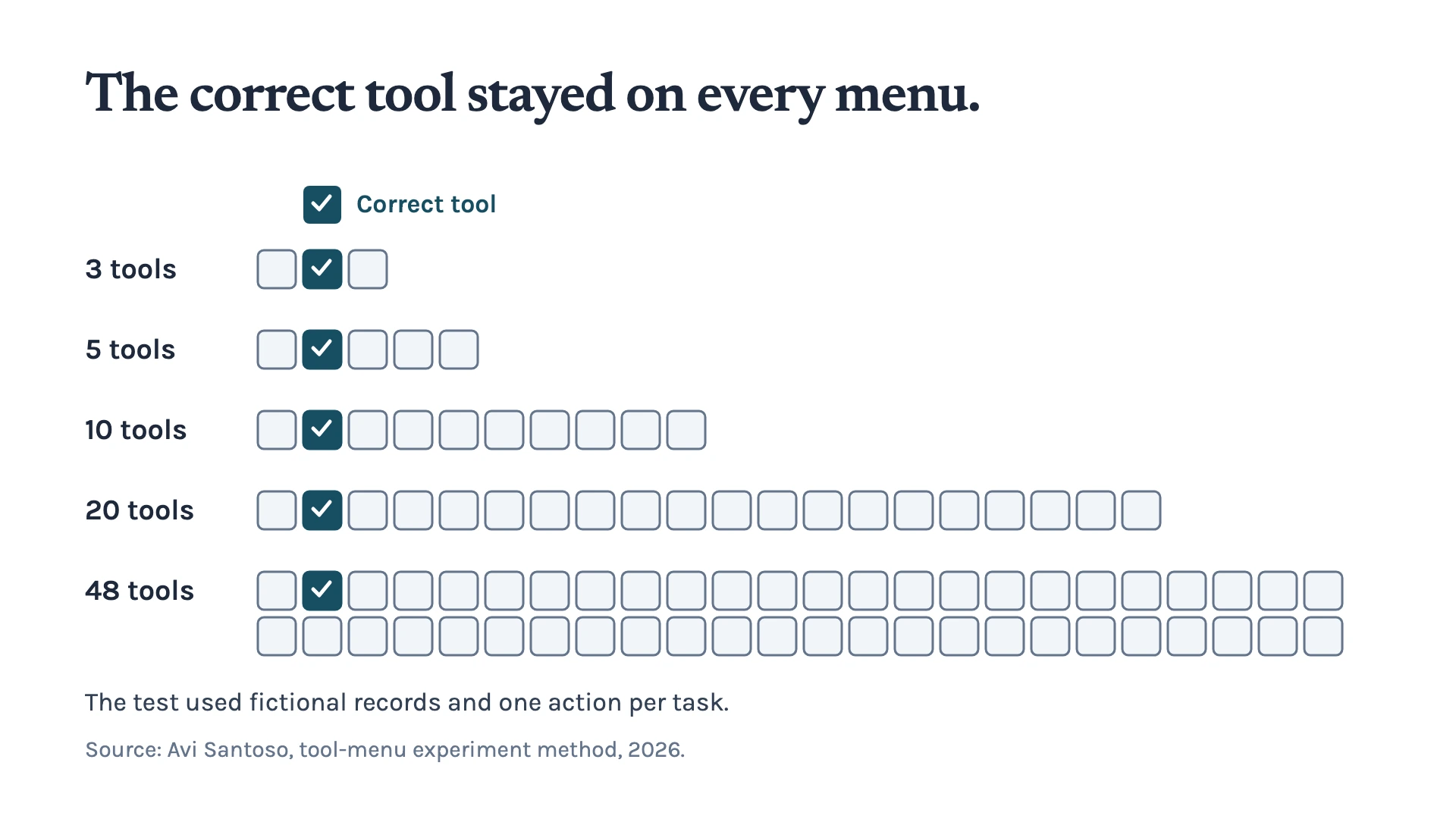
In this experiment, we gave three AI models the same 16 business scenarios and changed the number of tools available to them. The models could see 3, 5, 10, 20, or 48 tools depending on the test.
The correct tool was always included in the available list. The additional tools acted as distractors, allowing us to test whether a larger menu would make the AI more likely to choose the wrong action.
Then, we tested Mistral Small 3.2, Qwen3-30B-A3B-Instruct, and GPT-OSS-20B. Each combination of model, scenario, and tool-menu size was tested four times, giving us 960 calls across the full experiment.
We then looked at the results at several levels.
First, did the AI choose the correct tool?
Next, did it provide the exact information that tool required, such as the correct invoice ID, date, label, or status value?
Finally, did the tool execute successfully and leave the business record in the expected state?
This distinction matters because choosing the right tool is only the first step. An AI agent could identify the correct action but still provide the wrong ID or an invalid value, causing the task to fail.
More Tools Didn’t Make the AI Less Accurate
Our original expectation was that a larger tool menu would make the AI more likely to choose the wrong action. Turns out, the results didn’t support that.
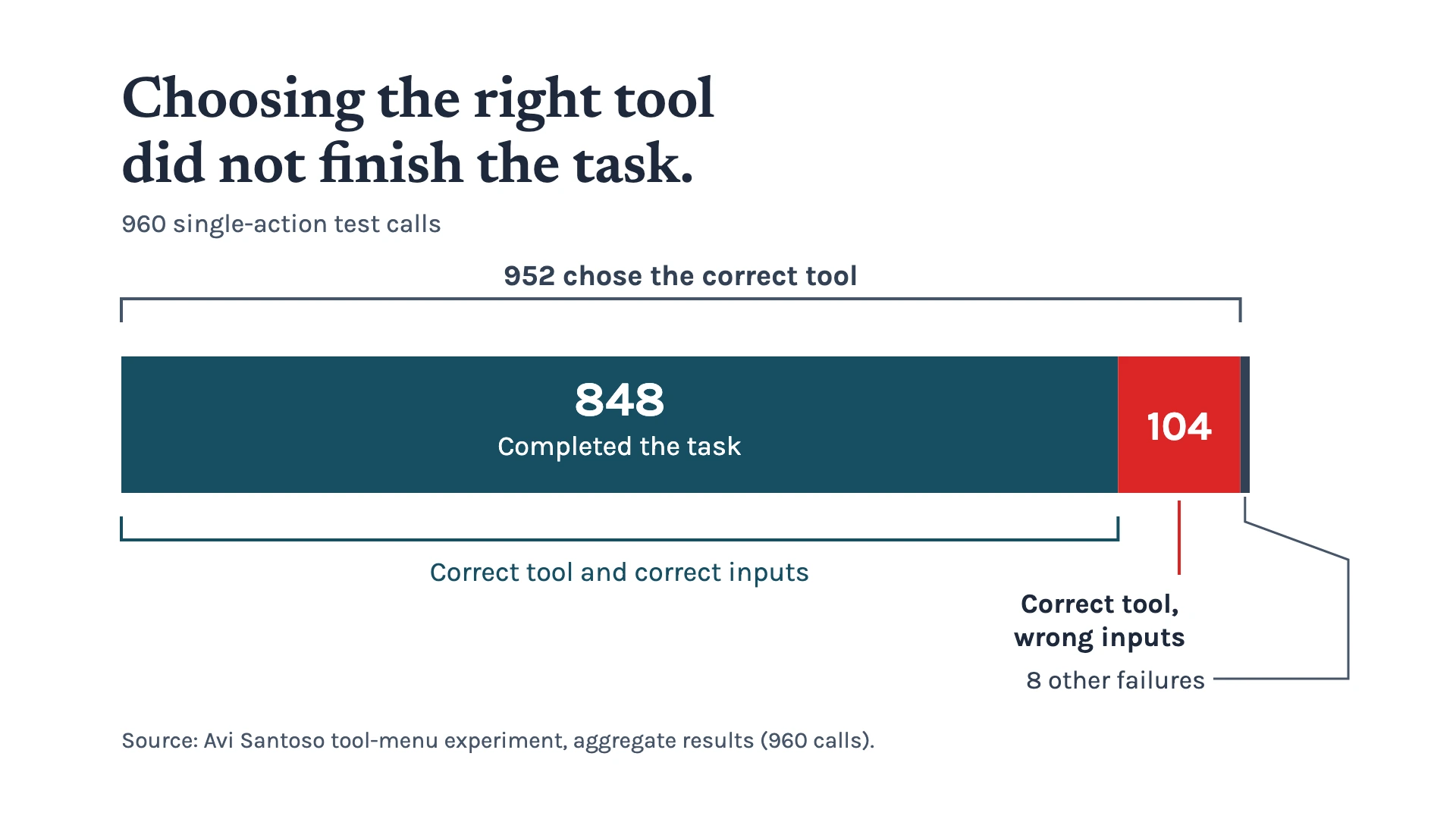
Across all 960 calls, the models selected the correct tool 952 times, giving an overall selection rate of 99.2%.
| Tools Available | Correct Tool Selection |
|---|---|
| 3 | 96.9% |
| 5 | 100% |
| 10 | 100% |
| 20 | 99.5% |
| 48 | 99.5% |
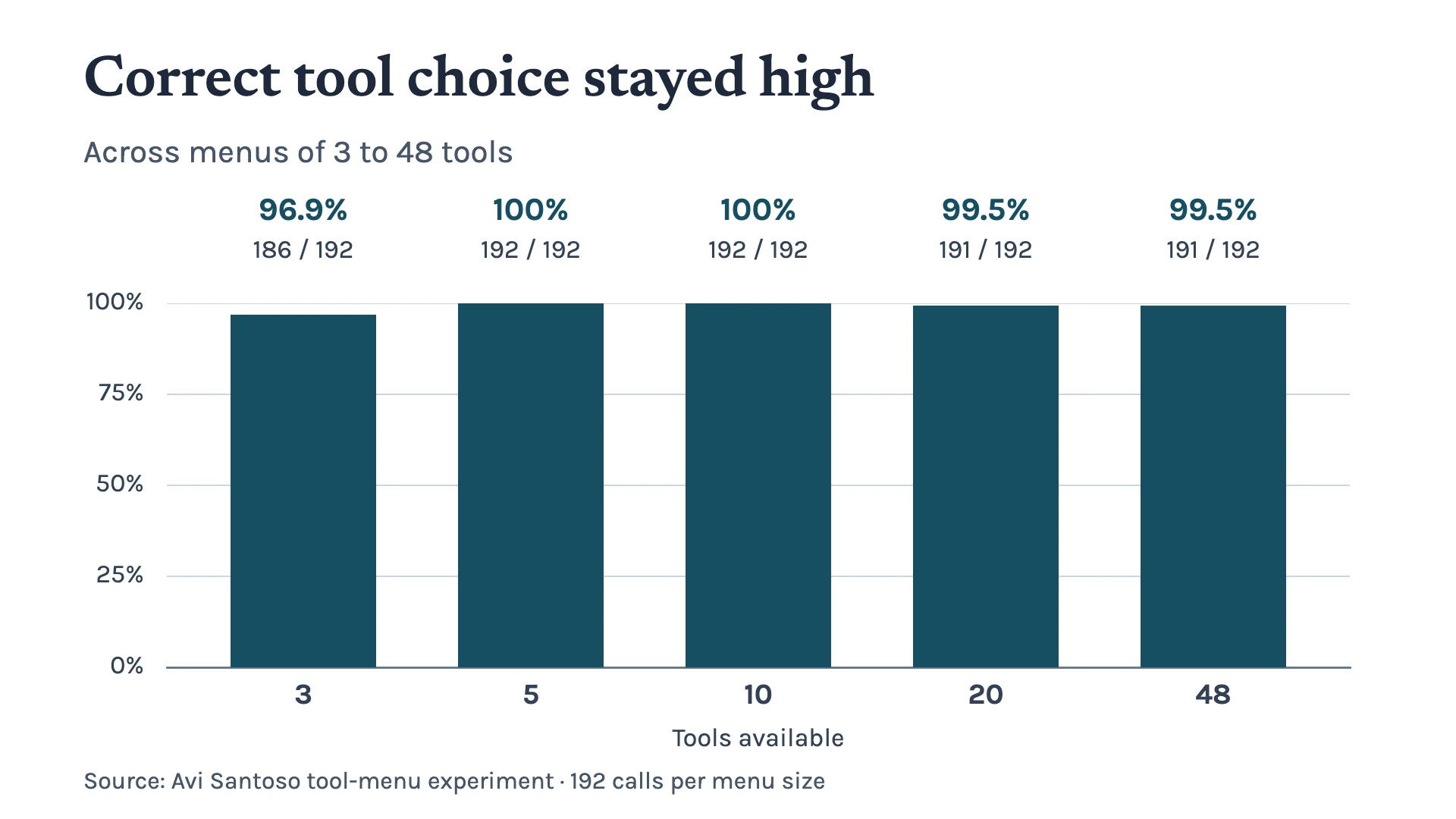
The 3-tool menu had the lowest combined result at 96.9%. Once we increased the menu to 5 tools, all three models selected the correct tool in every call. The combined selection rate stayed at 100% with 10 tools and 99.5% with both 20 and 48 tools.
So, increasing the number of available tools from 3 to 48 didn’t produce the drop in tool-selection accuracy we expected.
However, this doesn’t mean that giving an AI agent 48 tools is automatically better than giving it five. The experiment only shows that, in these scenarios and with these models, a larger menu did not create a sustained decline in the ability to select the correct tool.
The bigger problem appeared after the AI had already made the right choice.
It’s Not About Choosing The Right Tool
Choosing the right tool was only part of the problem. The harder part was getting the details right.
Across all tool-menu sizes, the models achieved 88.3% complete success. That means the model selected the correct tool, supplied all the required arguments correctly, executed the action, and produced the expected change in the business system.
The argument-accuracy results were 83.3% with 3 tools, 87.5% with 5, 89.1% with 10, 91.1% with 20, and 90.6% with 48 tools.
There was no clear pattern showing that more tools caused the models to perform worse. In fact, the highest complete-success and argument-accuracy results appeared in the larger menus in this particular experiment.
However, most failures happened after the model had already chosen the correct tool.
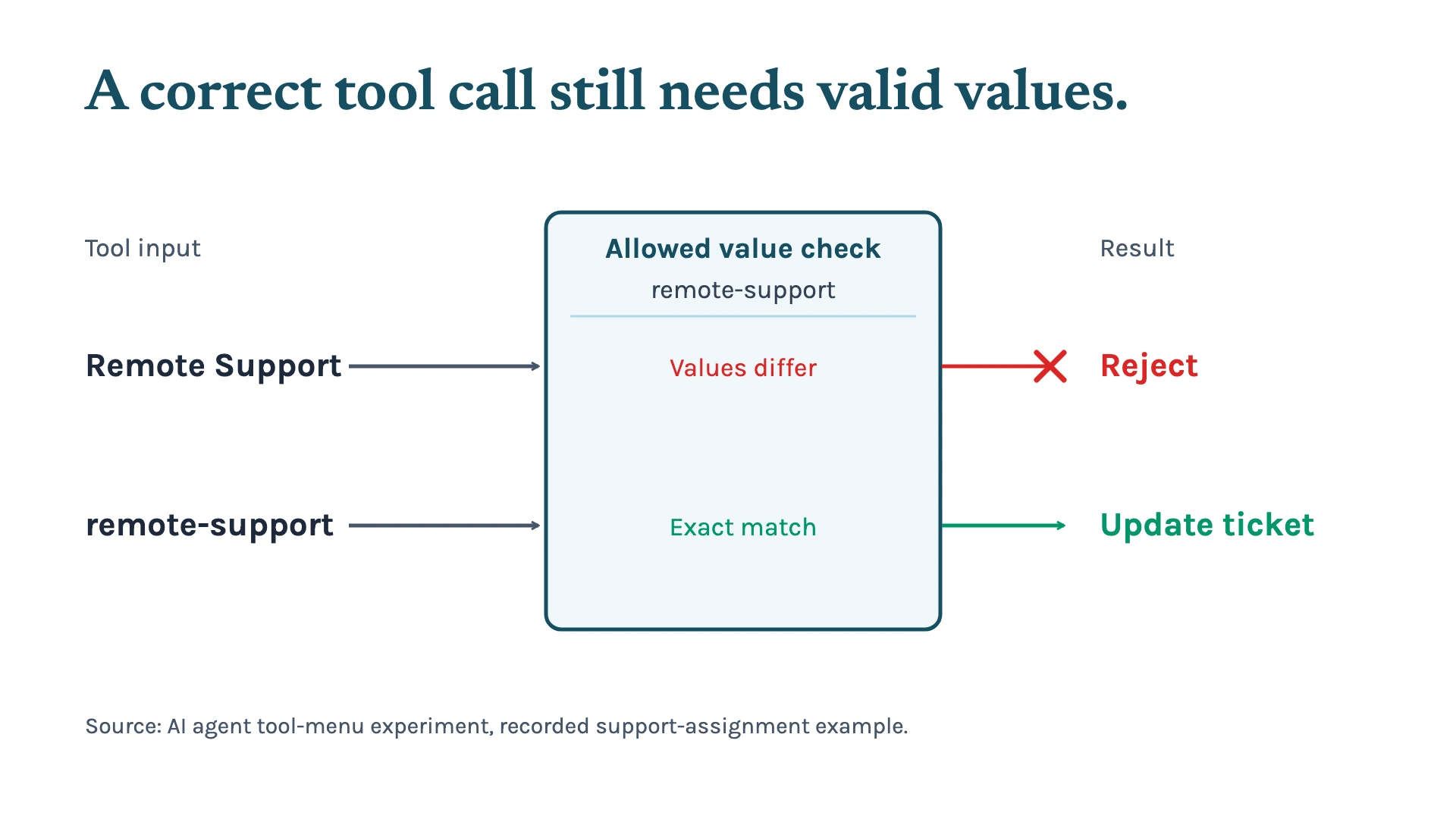
For example, a model might choose the right support-ticket tool but provide “Remote Support” when the system requires “remote-support”. Another selected the correct replacement tool but provided several unit IDs when only one was required.
In a few cases, the model did choose a related but incorrect business action, such as marking an invoice uncollectible instead of voiding a duplicate billing import.
The takeaway? An AI agent can choose the right tool and still get the task wrong. That makes input validation just as important as deciding which tools the agent can access.
So, How Many Tools Should an AI Agent Have?
Our results don't suggest that businesses need to split their AI agents into specialists simply because they have a large tool library.
A larger central tool registry can work, while relevant tools are filtered or routed to the agent for each request. As a practical starting point, showing an agent around 5–10 relevant tools can keep its working menu focused without limiting what it can access overall.
But tool count isn't the only thing to worry about. For business-critical actions, validating IDs, dates, status values, and other inputs — and requiring approval for high-impact changes — can be more important than simply reducing the number of available tools.
In the end, it's less about how many tools an AI agent can access and more about how reliably those tools are used. That’s where the right workflow design can make a difference.
If you're exploring how AI could fit into your business, we can help you design workflows that make the most of AI while keeping the right controls in place. Contact us to see where AI could improve your business workflows.
Keep up with what I'm working on
I'll send you occasional emails about new articles, tools and offers that could help with your business.