Employee Theft: What a Weekly Café Till Check Found
Our employee theft research compared three weekly POS checks. A simple exception list surfaced all 12 planted items while every closing cash count matched.
Watch the YouTube video
Watch on YouTubeArticle Summary
- 01
A weekly exception list surfaced all 12 planted items among 51 flagged transactions across four simulated weeks of café trading.
- 02
All 39 till sessions closed with zero cash difference while the planted activity totalled $63.50.
- 03
Comparing cashiers with colleagues surfaced 8 of 12 planted items in 11 shift cases, while the full exception list surfaced all 12.
Your till can balance perfectly at close and still hide employee theft. We built a café, set up fraud at the counter, and all the closing counts still came out right. If you were the owner counting that till each night, you would have gone home happy.
A weekly list of your cancellations, refunds, discounts and edited orders catches it. Taking the money is what creates the record: someone has to cancel the order or ring up a refund, and their name goes on it in your export.
So if you run a café, a restaurant or a bar, start with that list. It takes well under an hour a week, it fits alongside the books you already do, and it gives you named transactions to raise with your team.
Why We Tested Weekly Employee Theft Checks
If you run a café, restaurant or bar, you hand the till to your team on each shift. At close someone counts the money and compares the total with what the system expected. The two agree, so you tick it off and go home.
That tick tells you one thing only: the money in the till matches what got written down. Whether those records match what happened at the counter is a separate question, and the only way to resolve it is to read the transactions themselves.
I build anti-fraud systems and fraud checks for startups and enterprise businesses, and what that work shows is that looking closely at numbers tells you a lot about how people behave. Fraud leaves clues, so the useful question is which records give you a reason to look harder.
So what we wanted to know was this: can an owner who is far from the counter find suspicious activity in the records they already have? And which weekly report puts the right transactions in front of them?
We ran this on cash, because both of the patterns we tested keep the drawer and the system's expected cash moving together.
How the Cash Count Can Match While Money Goes Missing
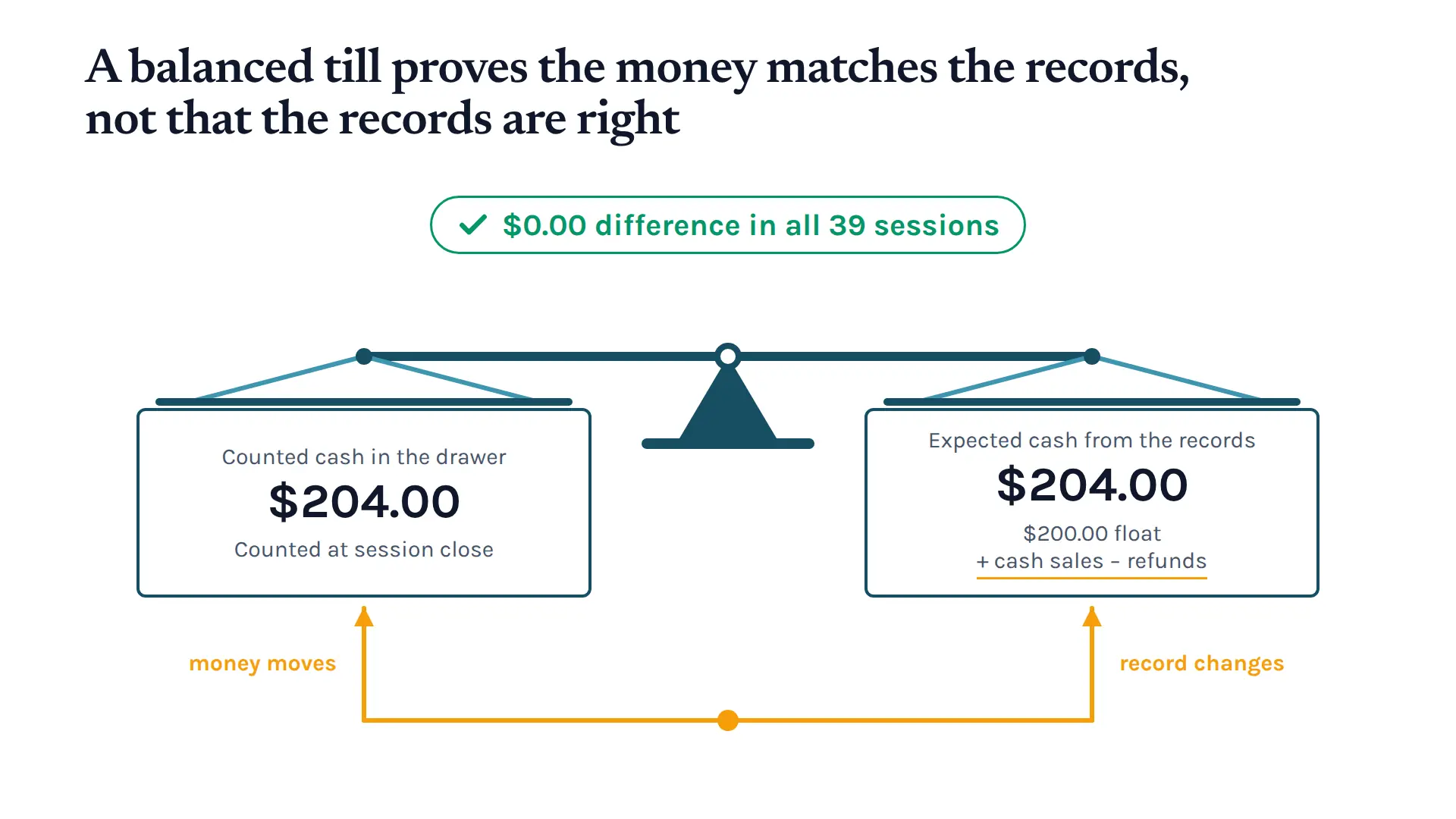
Your point of sale starts with the float you put in, adds each sale, then takes off refunds and any money going back out. That gives it the total it expects.1 A balanced till tells you the money matches the records. It does not tell you whether those records are right.
Someone taking cash out changes the record of the sale at the same moment they take the money. The closing count then agrees with the record they have just changed.
Cash collected before an order is cancelled
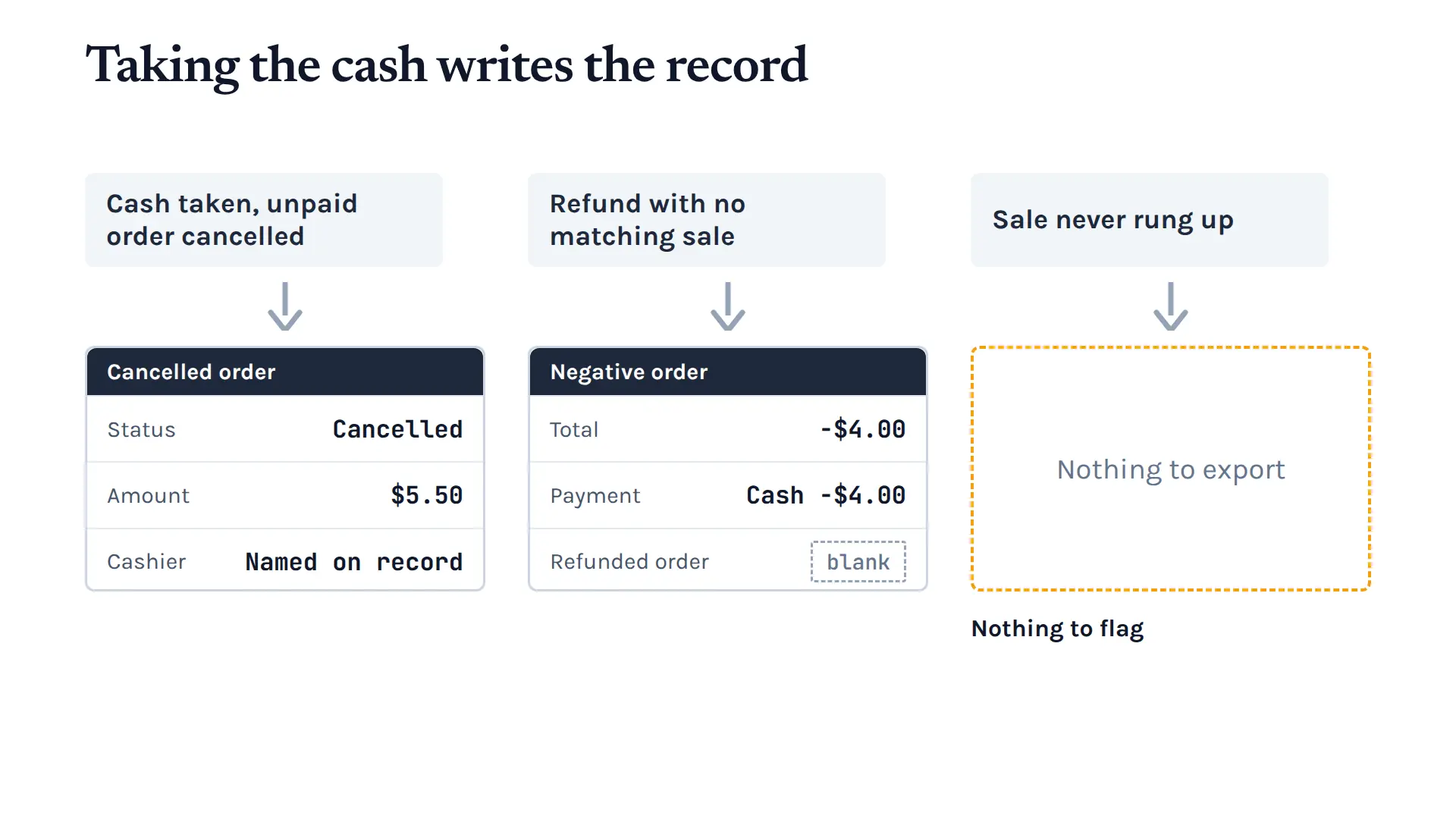
In the first pattern the customer gives the operator cash before anything goes into the system. The operator pockets it, then cancels the draft order before a payment is attached. That money was never in the expected total, so the till still balances at close.
Odoo logged the cancelled order in your export, with the amount on it and the cashier who cancelled it. That gives you something to collect and raise. Odoo also blocked attempts to cancel an order that had already been through payment.
A refund with no matching sale
In the second pattern the operator rings up a negative sale and takes that money out of the till. The expected total drops by the same amount, so the count matches again.
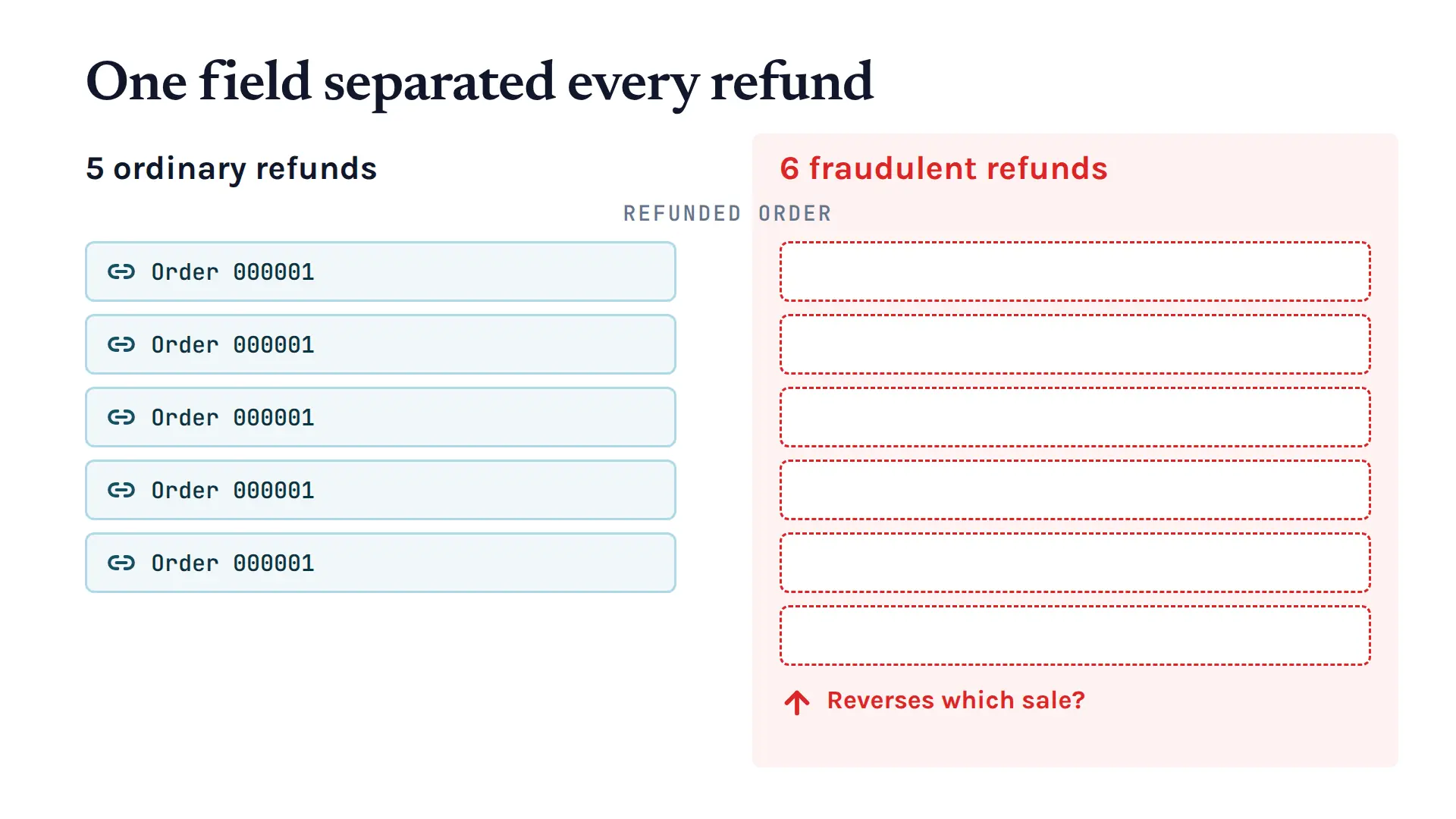
What it leaves behind is a negative order, a cash payment and a blank link to the original sale. Your next question writes itself: which customer purchase does this refund actually reverse?
A sale that never enters the system
The third pattern skips the order completely. The customer pays cash and the operator keeps it without putting anything into the system. That money never reaches the expected figure, so the reconciliation can still look right.
Nothing in your transaction list catches this one, because there is no transaction to catch. You need footage, a conversation with your team or a mystery shopper instead.
Building a Useful Weekly POS Fraud Review
We compared three ways of reading the same café records. Each one had that week's orders, payments and sessions to work with, plus the roster.
The first was Odoo's own lists, read by a person who wrote down which transactions they wanted to look into. That is you starting with what is already inside your point of sale.
The second was a spreadsheet with fixed rules in it. It pulled all cancelled orders, all negative refunds, all line discounts and all orders marked as edited, then checked each closed session for a difference between the money in the till and the money the system expected.
The third compared each cashier against the colleagues working overlapping shifts, looking at how often they produced exceptions and how much of their trade was cash. The idea was to pick out the shifts that stood out from the activity around them.
We also built in the everyday things that create exceptions in a café. A trainee corrected orders. Staff and customers got discounts. Real purchases were refunded. A card-reader failure threw up cancellations and refunds across several staff on one Saturday, and one week ran as normal trading with no fraud in it.
That normal activity is the point, because you need a report you will actually keep using. In that anti-fraud work, I have seen people start ignoring alerts once too much gets raised. A report is only useful when it gives you a short set of questions and a clear next check.
Here is what each approach put in front of the owner.
What the Three Approaches Found
What we found is that the act of taking the money creates the record, as a cancelled order in one scheme and a negative order in the other. The full exception list collected both kinds and found all 12 items we set up.
| Review approach | Planted items surfaced | Review workload | Items in the clean week |
|---|---|---|---|
| Odoo's own lists | 12 of 12 | 51 transactions | 9 transactions |
| Fixed-rule spreadsheet | 12 of 12 | 51 transactions | 9 transactions |
| Same-shift peer comparison | 8 of 12 | 11 shift cases | 1 shift case |
Once you pull every cancellation, refund, discount and edit, reading Odoo's own lists and running the spreadsheet rules hand you the same queue.
Of those 51 flags, 12 were the items we set up and the rest were normal trading. The weekly list ran from 9 to 19 items, and the busiest week was the one with the card-reader failure, which added cancellations and refunds on top.
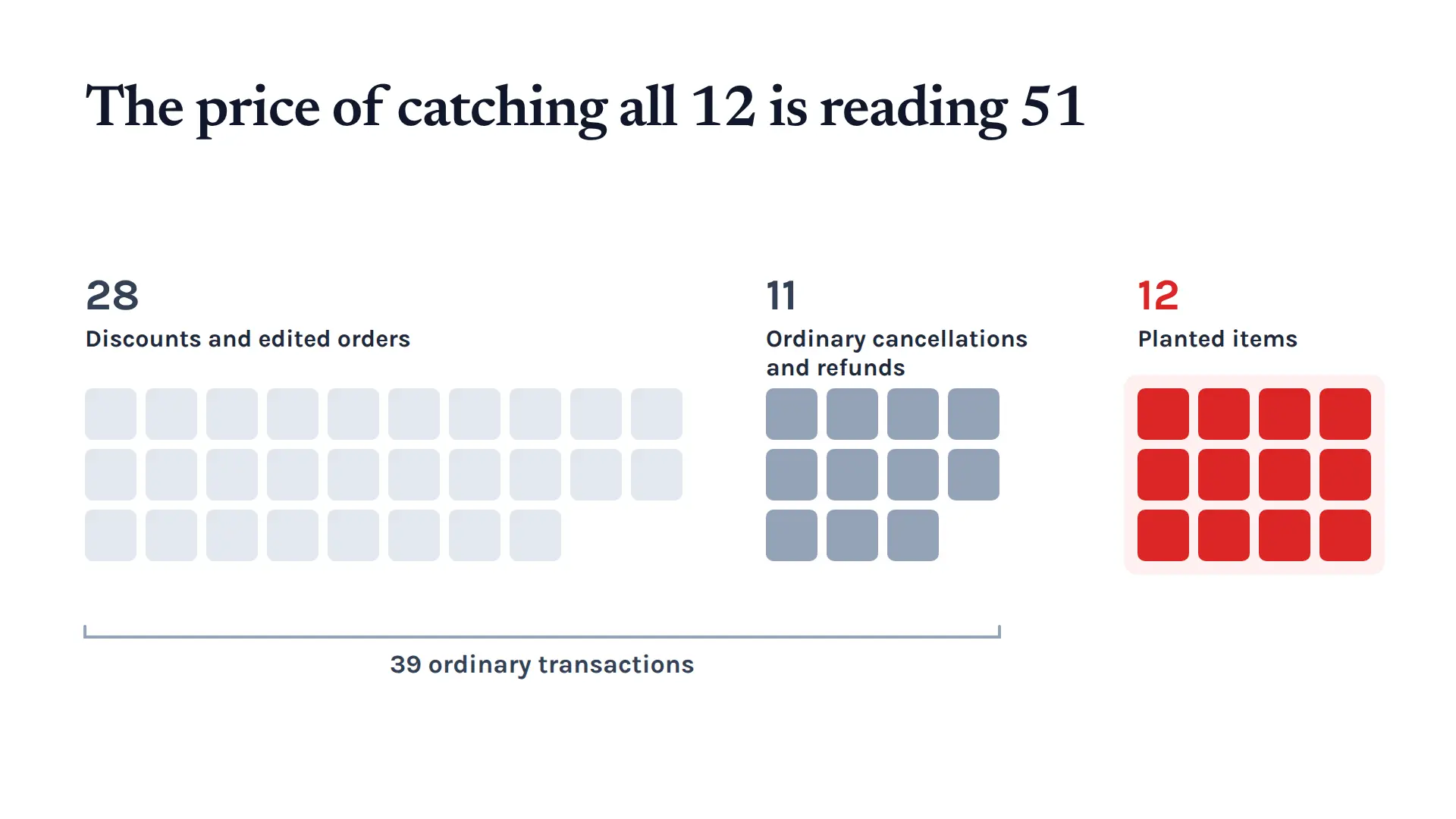
That is the work behind catching everything, and each flag hands a person something specific to check.
Refund links gave the clearest signal
None of the fraudulent refunds had an original sale linked to them, while all the normal ones named the sale they reversed. That single field split the two groups each time.
Cancellations needed more context around them. The failure-day cancellations had the same shape as the fraudulent ones: a cancelled order, an amount and no payment. What explained them was the day they appeared on and the activity around them.
All the discounts and edited orders turned out to be normal, and between them they made up 28 of the 51 flags. The week with no fraud in it still produced 9 flags: 4 discounts, 4 edited orders and 1 linked refund.
Peer comparison produced fewer cases
Across 11 shift cases, the comparison script picked up all 6 fraudulent refunds and 2 of the manager's cancellations, and most of the orders behind those cases were normal activity.
It only flags a shift when there are at least two exception orders and a rate that stands out against colleagues. That is why the paired refunds came up every time, and why it suits someone building exceptions up inside a single shift.
So peer comparison works as a second view, pointing you at unusual concentrations of activity rather than at single transactions.
Collusion required evidence beyond the cashier field
The manager directed cancellations that the senior cashier made, and all of them appeared under the senior cashier's login. The full exception list found all of them. The peer script found none, because each one was the only exception in that shift.
This is the toughest pattern to spot, because most controls assume one person is acting alone and the people around them will raise it.2 The records named the operator and stopped there. Working out who requested the cancellation, and who ended up with the money, needs proof from outside the till.
The system determines which records exist
Odoo's no-sale till button left no order, no payment and no till-open record when we tried it in software, so a weekly transaction list has nothing to collect from it. Money lifted straight out of the till shows up differently, as a shortage at close.
So check what your own point of sale actually keeps, including cancellations, refund links and changes to saved orders. That decides what you can review each week, and where you need a physical check instead.
What an Owner Should Do With the List
Start by exporting the last few weeks out of your own till system. Filter the orders down to cancellations, refunds, discounts and edits. Keep the receipt, date, cashier, amount and reason for each flag together in one place.
For a refund, find the original sale and check why the money went back. For a cancellation, check the customer ticket and ask why the order was stopped. For discounts and edits, hold them against your staff, goodwill and training records.
Read groups of transactions together rather than one at a time. A burst of cancellations across several people on one day gives you a reason to check the incident log. The same login turning up week after week gives you a reason to look across weeks.
Our recommendation is to rank what you find by how likely and how serious it is, then look at the top one to three. Trying to work through everything at once is how owners end up doing none of it.
The cashier on the record tells you who operated the till and nothing beyond that, so ask who requested the action as part of your follow-up. Approval records, the roster, footage and a conversation with your team fill in what happened around that transaction.
At this café's volume, allow 20 to 35 minutes a week for filtering and checking exceptions by hand. That is about two flagged transactions a day, or a few minutes of reading. It fits beside the bookkeeping you already do each week.
A Weekly Routine That Helps You Trust Your Team
The principle we give business owners is trust, but verify. Checking regularly means you see unusual activity early, and you can ask a specific question about it while people still remember the shift.3 When your team knows someone reads the books, verifying is exactly what lets you trust them more.4
All 39 closing counts in our café came out right, and the weekly list still found all 12 items we set up. A spreadsheet built on plain rules did the same job as reading the native lists, so you do not need anything clever to run this.
It is worth taking a look at your own records this week, even if all you do is read one month of exceptions.
We break down the full experiment, the weekly list and the figures behind it in the research report. Join our email list at avisantoso.com and we'll send you the new research on automation and process improvement for small and medium businesses.
References
- Odoo (2026). Point of Sale workflow and cash control, Odoo 19 documentation. https://www.odoo.com/documentation/19.0/applications/sales/point_of_sale/use.html
- Association of Certified Fraud Examiners (2026). Collusion by Perpetrators, Occupational Fraud 2026: A Report to the Nations. https://cms.acfe.com/-/media/files/acfe/pdfs/rttn/2026/infographics/collusion-by-perpetrators.pdf
- Association of Certified Fraud Examiners (2026). Key Findings, Occupational Fraud 2026: A Report to the Nations. https://cms.acfe.com/-/media/files/acfe/pdfs/rttn/2026/infographics/key-findings.pdf
- Washington University in St. Louis (2013). IT monitoring effective in deterring restaurant fraud. https://source.washu.edu/2013/09/it-monitoring-effective-in-deterring-restaurant-fraud/
Keep up with what I'm working on
I'll send you occasional emails about new articles, tools and offers that could help with your business.