Fine-Tuning Local AI for Finance Teams With Unsloth Desktop
See how we fine-tuned local AI with Unsloth Desktop to improve supplier-bill classification and support more consistent coding for finance teams.
Watch the YouTube video
Watch on YouTubeArticle Summary
- 01
In a controlled test with 200 frozen synthetic supplier-bill examples and eight fixed Xero expense accounts, fine-tuning Llama 3.1 8B increased classification accuracy from 70.5% to 99.5%.
- 02
In the same supplier-bill test, fine-tuning increased exact-format compliance from 3.5% to 99.5%, helping the local AI model return answers in the format the workflow required.
- 03
Unsloth Desktop let us train and run the supplier-bill model on our own MacBook. Running a finance model locally gives a business control over where its training data and supplier-bill information are processed.
For years, bigger AI models have received most of the attention. They’ve got more parameters, more computing power, and the kind of broad capability that makes almost any business task seem possible.
But finance teams don’t always need an AI that can do everything. They may need one that handles a specific, repetitive task consistently. That could mean classifying supplier bills and returning an answer their workflow can use without someone having to clean it up.
So, we tested whether a smaller local AI model could become more reliable for one narrow finance task. Its job was to select the right expense account for a supplier bill.
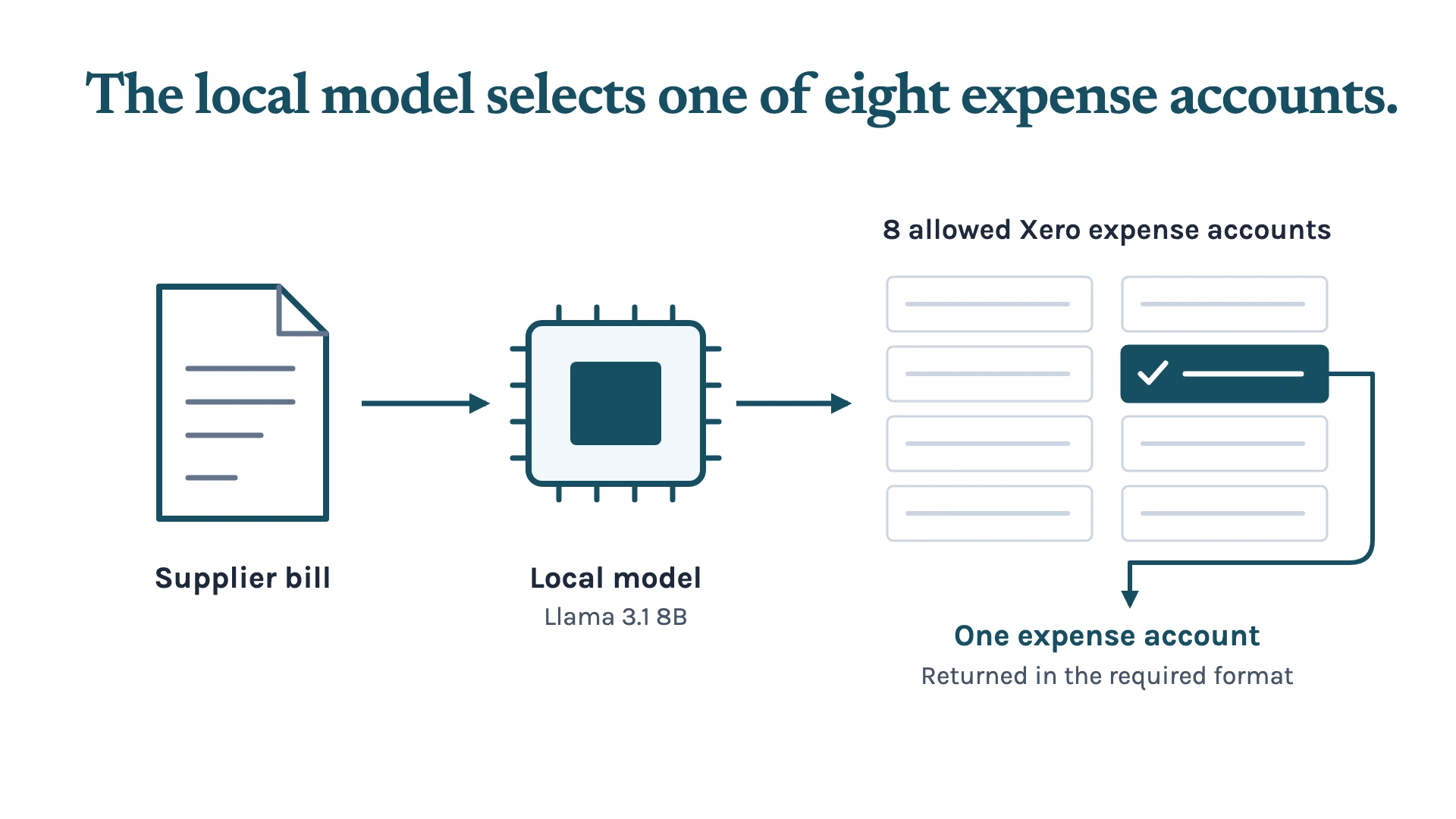
In our controlled test, the model had to choose from eight fixed Xero expense accounts and return its answer in a specific format. Before fine-tuning, Llama 3.1 8B selected the correct account 70.5% of the time. After fine-tuning, the same model’s account accuracy increased to 99.5%.
In a bookkeeping workflow, a wrong account creates more work than correcting a label. Someone has to find the error, check the bill, and review the account choice again. That slows down review and leaves a person checking the same routine decision the automation was meant to handle, right?
Here’s the opportunity: you can train a small model for your own specific finance tasks, on hardware you already own. We used Unsloth Desktop to train and test ours on an M1 Pro MacBook with 16 GB of memory. The training ran locally, and so did the model.
For a finance team handling sensitive client information, that gives you control over where the data is processed. You can use your own business data for training and run the model locally. That keeps the information on your machine, giving you control over where sensitive client data is processed.
What We Tested: Supplier Bill Classification With Local AI
We gave the smaller model a narrow job with a fixed set of answers. It had to classify each supplier bill into one of eight approved Xero expense accounts.
That might sound simple, but it reflects the type of repeated decision that can slow a finance workflow down. A supplier name, bill description, or line item may look familiar. The correct account still depends on the business’s chart of accounts and coding rules, while the workflow needs a consistent output format.
For this test, we ran Llama 3.1 8B Instruct locally through Unsloth Desktop. Our hardware was an M1 Pro MacBook with 16 GB of memory. We then fine-tuned the model using QLoRA, a method that adapts a model for a specific task without retraining it from scratch.
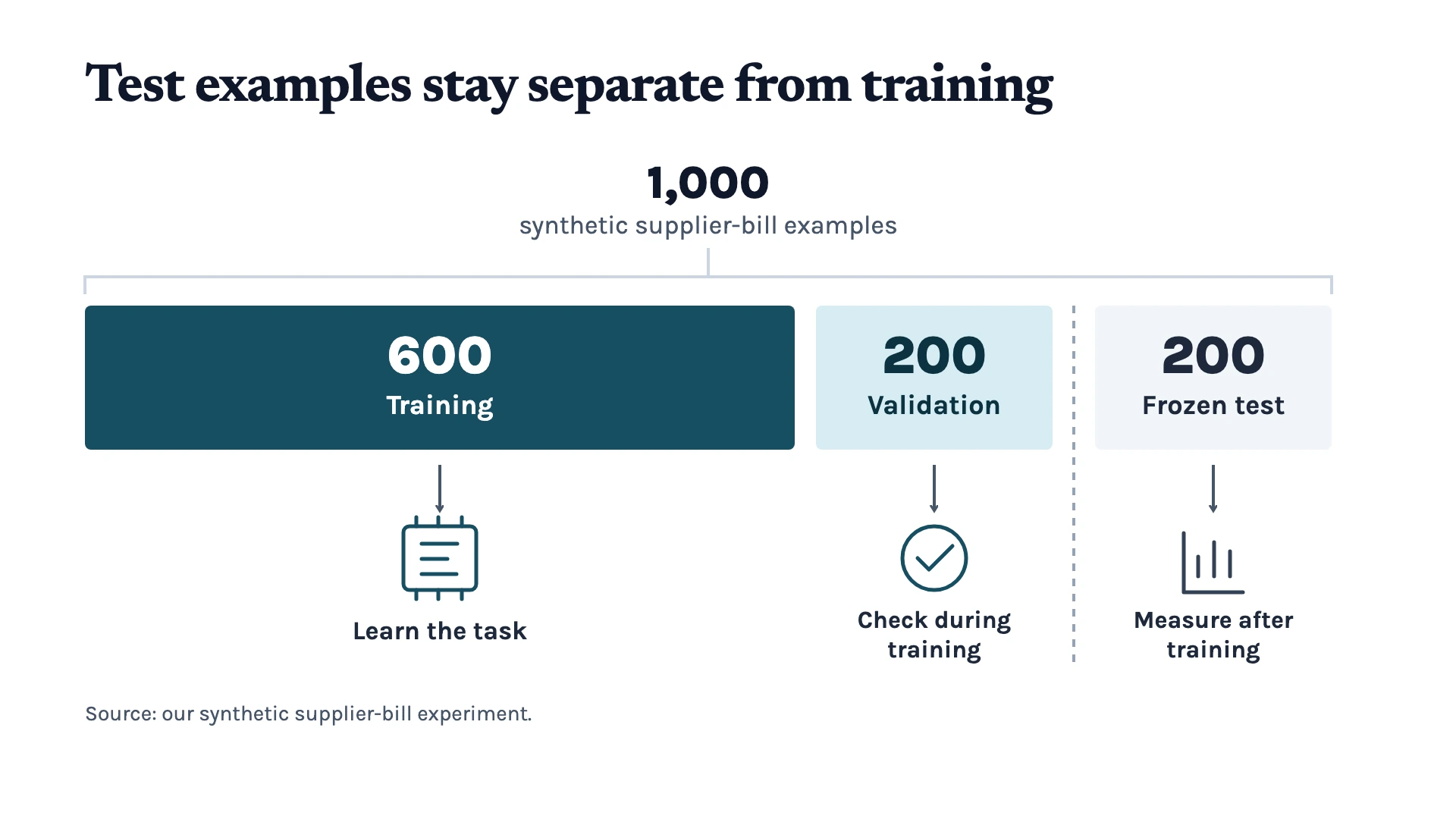
The dataset had 600 labelled training examples and 200 validation examples. We kept another 200 examples in a frozen test set. Each example used synthetic supplier-bill data and asked the model to choose from the same eight approved Xero categories.
The frozen test set stayed separate from training throughout the experiment. We could then check how the model performed on examples it hadn’t seen before, using the same task and account choices.
Here’s what changed after fine-tuning the model for our supplier-bill classification test:
| Metric | Base Model | Fine-Tuned Model |
|---|---|---|
| Classification accuracy | 70.5% | 99.5% |
| Valid-label rate | 86% | 99.5% |
| Exact-format compliance | 3.5% | 99.5% |
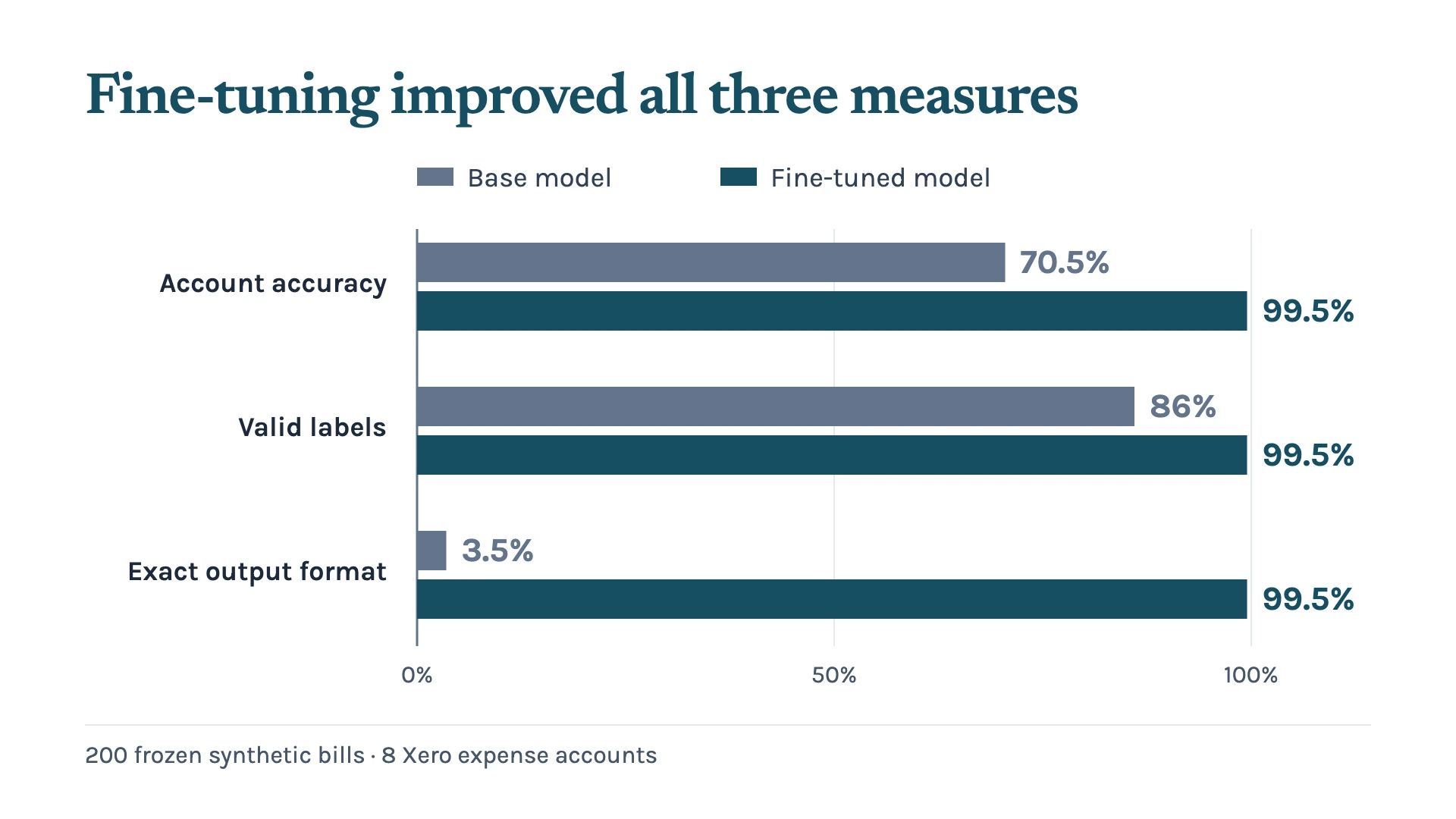
The biggest improvement in our test was in output format. Before fine-tuning, the model returned the exact format we asked for just 3.5% of the time. After training, the model’s exact-format compliance reached 99.5% on the same test set. For a bookkeeping workflow, getting the account choice and format right means the answer can pass straight into the next step.
We got those results from a single training run in Unsloth Desktop, letting the MacBook do its thing for about three hours. The model learned from our supplier-bill examples and returned the account labels in the format we asked for.
That’s the opportunity for a bookkeeping team: train a model around your own chart of accounts and coding patterns. You can then run that trained model locally on your own machine. The data used for training and classification can stay within the business.
We built the synthetic supplier-bill dataset to see how convenient Unsloth Desktop was for training a model on our own machine. Through the app, we could select a model, upload our examples, and start training. We measured the results against 200 frozen test examples across eight Xero expense accounts.
How We Trained the Model With Unsloth Desktop
We picked Llama 3.1 8B Instruct and prepared our training examples in a JSONL file. Each row paired a supplier-bill description with the expense account we wanted the model to return. Our 1,000 examples were split into 600 for training, 200 for validation, and 200 for testing.
In Unsloth Desktop, we selected the model, uploaded the training file, and chose QLoRA for the training run on our MacBook. This freezes the base model and trains a small adapter, which is how the training fits on a laptop. We used three epochs, a learning rate of 0.0002, and a context length of 2048.
Keep Sensitive Finance Data on Your Own Machine
Supplier bills contain information about your clients, their suppliers, and how their business spends money. For a finance team, where that information goes matters.
Running the model locally lets you process those bills on hardware your business controls. The supplier descriptions, account labels, and coding examples can stay on your machine throughout training and classification. You decide who can access the model and the data it uses.
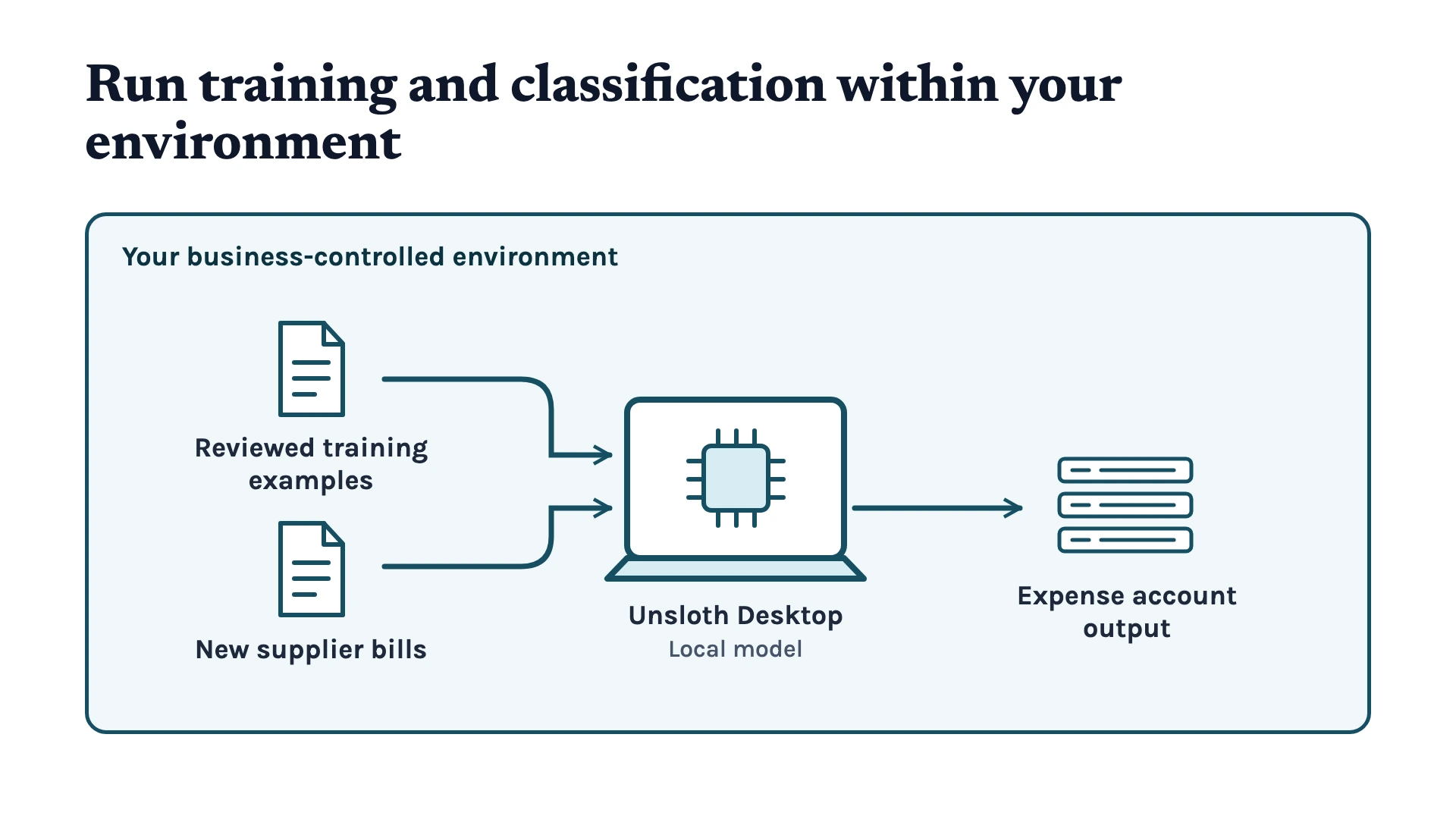
That’s one of the main reasons we wanted to try this setup. We could train a model for our bookkeeping task and run it locally, keeping the data within our own environment. For an Australian finance business, that gives you a way to use AI on sensitive client information while keeping its processing in Australia.
Try Local AI With Your Own Finance Workflow
We used synthetic supplier-bill data, and even with that, the improvements were large. Using reviewed examples from your own business would make the test more relevant to your suppliers, account choices, and coding patterns. Better training data gives the model better examples to learn from.
To try this in your own business, download Unsloth Desktop and pick a model that fits your machine. Prepare a dataset pairing each input with the answer you want, then split it into training, validation, and test examples. Upload the training data, configure the run, and click train. Once it finishes, compare the base and fine-tuned models against your test examples to see what changed.
If you’re running a finance business, we can help you fine-tune a local model or keep your client data in Australia. Get in touch with us to discuss what you want to do in your business. Me and my team can help you work through the setup and test it against your finance workflow.
Keep up with what I'm working on
I'll send you occasional emails about new articles, tools and offers that could help with your business.